
Step By Step Installation 11gR2 Non ASM
========================================
Connect as root user:
1.) groupadd dba
2.) useradd -d /home/oracle -g dba -G dba oracle
3.) Create directories for oracle grid installation, the directory path should not be same as $ORACLE_BASE. Assuming $ORACLE_BASE=/oracle.
mkdir /oragrid
Make sure the directory as atleast 5GB free space.
4.) Change the owner of the directory to oracle:dba
chown -R oracle:dba /oragrid
5.) RPM requirements (From Metalink note# 880989.1:
        1.) binutils-2.17.50.0.6-6.el5 (x86_64)
        2.) compat-libstdc++-33-3.2.3-61 (x86_64) <<< both ARCH's are required. See next line.
        3.) compat-libstdc++-33-3.2.3-61 (i386) <<< both ARCH's are required. See previous line.
        4.) elfutils-libelf-0.125-3.el5 (x86_64)
        5.) glibc-2.5-24 (x86_64) <<< both ARCH's are required. See next line.
        6.) glibc-2.5-24 (i686) <<< both ARCH's are required. See previous line.
        7.) glibc-common-2.5-24 (x86_64)
        8.) ksh-20060214-1.7 (x86_64)
        9.) libaio-0.3.106-3.2 (x86_64) <<< both ARCH's are required. See next line.
        10.) libaio-0.3.106-3.2 (i386) <<< both ARCH's are required. See previous line.
        11.) libgcc-4.1.2-42.el5 (i386) <<< both ARCH's are required. See next line.
        12.) libgcc-4.1.2-42.el5 (x86_64) <<< both ARCH's are required. See previous line.
        13.) libstdc++-4.1.2-42.el5 (x86_64) <<< both ARCH's are required. See next line.
        14.) libstdc++-4.1.2-42.el5 (i386) <<< both ARCH's are required. See previous line.
        15.) make-3.81-3.el5 (x86_64)
     16.) elfutils-libelf-devel-0.125-3.el5.x86_64.rpm
            a.) requires elfutils-libelf-devel-static-0.125-3.el5.x86_64.rpm as a prerequisite, as listed below.
            b.) elfutils-libelf-devel and elfutils-libelf-devel-static each depend upon the other. Therefore, they must be installed together, in one (1) "rpm -ivh" command as follows:
                 rpm -ivh elfutils-libelf-devel-0.125-3.el5.x86_64.rpm elfutils-libelf-devel-static-0.125-3.el5.x86_64.rpm
        17.) glibc-headers-2.5-24.x86_64.rpm
            a.) requires kernel-headers-2.6.18-92.el5.x86_64.rpm as a prerequisite, as listed below
        18.) glibc-devel-2.5-24.x86_64.rpm <<< both ARCH's are required. See next item.
        19.) glibc-devel-2.5-24.i386.rpm <<< both ARCH's are required. See previous item.
        20.) gcc-4.1.2-42.el5.x86_64.rpm
            a.) requires libgomp-4.1.2-42.el5.x86_64.rpm as a prerequisite, as listed below
        21.) libstdc++-devel-4.1.2-42.el5.x86_64.rpm
        22.) gcc-c++-4.1.2-42.el5.x86_64.rpm
        23.) libaio-devel-0.3.106-3.2.x86_64.rpm <<< both ARCH's are required. See next item
        24.) libaio-devel-0.3.106-3.2.i386.rpm <<< both ARCH's are required. See previous item.
        25.) sysstat-7.0.2-1.el5.x86_64.rpm
        26.) unixODBC-2.2.11-7.1.x86_64.rpm <<< both ARCH's are required. See next item
        27.) unixODBC-2.2.11-7.1.i386.rpm <<< both ARCH's are required. See previous item.
        28.) unixODBC-devel-2.2.11-7.1.x86_64.rpm <<< both ARCH's are required. See next item
        29.) unixODBC-devel-2.2.11-7.1.i386.rpm <<< both ARCH's are required. See previous item.
Command to check:
rpm -qa |grep -E "binutils|compat-libstdc++|elfutils-libelf-|glibc-|glibc-common-|ksh-|libaio-|libgcc-|libstdc++|make|gcc|sysstat|unixODBC"
6.) Values for /etc/sysctl.conf (these are suggested, these values should be calculated with respect to the memory/cpu/processes of the server.)
    kernel.shmall = physical RAM size / pagesize For most systems
    kernel.shmmax = 1/2 of physical RAM eg. for 32g ram it should be 17179869184.
    kernel.shmmni = 4096
    kernel.sem = 250 32000 100 128
    fs.file-max = 409200
    fs.aio-max-nr = 1048576
    net.ipv4.ip_local_port_range = 9000 65500
    net.core.rmem_default = 262144
    net.core.rmem_max = 4194304
    net.core.wmem_default = 262144
    net.core.wmem_max = 1048576
7.) Make sure u have configured a scan IP, for more details on what is scan IP please refer to: http://www.oracle.com/technetwork/database/clustering/overview/scan-129069.pdf
Make sure your /etc/hosts file has entries or hostname, host IP address, Interconnect name, Interconnect IP address, virtual hostname, virtual host IP address for all RAC nodes and on all RAC nodes.
8a.) Since we are using Network Time Protocol (NTP) for synchronization of time across all the servers in the cluster, a mandatory requirement with 11gR2 is to enable the slewing option by adding ‘-x’ argument in the ntp configuration file as seen below: -
# vi /etc/sysconfig/ntpd
# Drop root to id 'ntp:ntp' by default.
OPTIONS="-x -u ntp:ntp -p /var/run/ntpd.pid" #add -x in the options string.
# Set to 'yes' to sync hw clock after successful ntpdate
SYNC_HWCLOCK=no
# Additional options for ntpdate
NTPDATE_OPTIONS=""
Restart ntpd daemon.
[root@node1 oracle]# /etc/init.d/ntpd stop
Shutting down ntpd: [ OK ]
[root@node1 oracle]# /etc/init.d/ntpd start
ntpd: Synchronizing with time server: [ OK ]
Starting ntpd: [ OK ]
8b.) Update /etc/security/limits.conf with:
         oracle soft nproc 2047
         oracle hard nproc 16384
         oracle soft nofile 1024
         oracle hard nofile 65536
9.) Add following line in the /etc/pam.d/login file:
session required pam_limits.so
10.) Add the following lines to /etc/profile:
         if [ $USER = "oracle" ]; then
            if [ $SHELL = "/bin/ksh" ]; then
                ulimit -u 16384
                ulimit -n 65536
            else
                ulimit -u 16384 -n 65536
            fi
         fi
11.) Setup user equivalence between the oracle user of the rac nodes.
12.) Run Cluverify (change directory where you have copied and unzipped the oracle 11gr2 grid software)
#./runcluvfy.sh stage -pre crsinst -n node1,node2 -verbose
--Fix any error you see.
13.) Start ./runInstaller
Screenshots:
Welcome Screen
14.) 
Select Advanced Installation
15.)
Select all required languages, I have selected only English
16.)
Specify scan name, cluster name, and scan listener port.
17.) 
Provide RAC node information, along with virtual name.
18.)
Review is the the interfaces, subnet mask are correct and select the public/private accordingly.(private is for interconnect).
19.) 
Oracle will do some validation checks
20.)
Select ASM/shared file system, depending on what u are using. I am using shared file system.
21.)
Select location for OCR.
22.)
Select location of voting disks.
23.)
Failure Support, I dont plan to use this.
24.)
Select the OS groups.
25.) 
Warning message, ignore it
26.)
Specify oracle_base and grid installation folder.
27.)
Specify Oracle Inventory Location.
28.)
Oracle perform pre-checks. I am ignoring swap space issue.
29.)
Final summary page!!
30.)
Ignore this warning
31.)
Shows installation Progress
32.)
Run the scripts
33.) Run /oracle/oraInventory/orainstRoot.sh
[root@node1 oraInventory]# ./orainstRoot.sh
Changing permissions of /oracle/oraInventory.
Adding read,write permissions for group.
Removing read,write,execute permissions for world.

Changing groupname of /oracle/oraInventory to dba.
The execution of the script is complete.
34.) Run $GRID_HOME/root.sh
[root@node1 11.2]# ./root.sh
Running Oracle 11g root.sh script...

The following environment variables are set as:
    ORACLE_OWNER= oracle
    ORACLE_HOME=  /oragrid/product/11.2

Enter the full pathname of the local bin directory: [/usr/local/bin]:
   Copying dbhome to /usr/local/bin ...
   Copying oraenv to /usr/local/bin ...
   Copying coraenv to /usr/local/bin ...


Creating /etc/oratab file...
Entries will be added to the /etc/oratab file as needed by
Database Configuration Assistant when a database is created
Finished running generic part of root.sh script.
Now product-specific root actions will be performed.
2010-08-27 23:25:19: Parsing the host name
2010-08-27 23:25:19: Checking for super user privileges
2010-08-27 23:25:19: User has super user privileges
Using configuration parameter file: /oragrid/product/11.2/crs/install/crsconfig_params
Creating trace directory
LOCAL ADD MODE
Creating OCR keys for user 'root', privgrp 'root'..
Operation successful.
  root wallet
  root wallet cert
  root cert export
  peer wallet
  profile reader wallet
  pa wallet
  peer wallet keys
  pa wallet keys
  peer cert request
  pa cert request
  peer cert
  pa cert
  peer root cert TP
  profile reader root cert TP
  pa root cert TP
  peer pa cert TP
  pa peer cert TP
  profile reader pa cert TP
  profile reader peer cert TP
  peer user cert
  pa user cert
Adding daemon to inittab
CRS-4123: Oracle High Availability Services has been started.
ohasd is starting
CRS-2672: Attempting to start 'ora.gipcd' on 'node1'
CRS-2672: Attempting to start 'ora.mdnsd' on 'node1'
CRS-2676: Start of 'ora.gipcd' on 'node1' succeeded
CRS-2676: Start of 'ora.mdnsd' on 'node1' succeeded
CRS-2672: Attempting to start 'ora.gpnpd' on 'node1'
CRS-2676: Start of 'ora.gpnpd' on 'node1' succeeded
CRS-2672: Attempting to start 'ora.cssdmonitor' on 'node1'
CRS-2676: Start of 'ora.cssdmonitor' on 'node1' succeeded
CRS-2672: Attempting to start 'ora.cssd' on 'node1'
CRS-2672: Attempting to start 'ora.diskmon' on 'node1'
CRS-2676: Start of 'ora.diskmon' on 'node1' succeeded
CRS-2676: Start of 'ora.cssd' on 'node1' succeeded
CRS-2672: Attempting to start 'ora.ctssd' on 'node1'
CRS-2676: Start of 'ora.ctssd' on 'node1' succeeded
clscfg: -install mode specified
Successfully accumulated necessary OCR keys.
Creating OCR keys for user 'root', privgrp 'root'..
Operation successful.
CRS-2672: Attempting to start 'ora.crsd' on 'node1'
CRS-2676: Start of 'ora.crsd' on 'node1' succeeded
Now formatting voting disk: /u05/cludata/votedisk1.
Now formatting voting disk: /u01/oradata/orcl/cludata/votedisk2.
Now formatting voting disk: /u02/oradata/orcl/cludata/votedisk3.
CRS-4603: Successful addition of voting disk /u05/cludata/votedisk1.
CRS-4603: Successful addition of voting disk /u01/oradata/orcl/cludata/votedisk2.
CRS-4603: Successful addition of voting disk /u02/oradata/orcl/cludata/votedisk3.
##  STATE    File Universal Id                File Name Disk group
--  -----    -----------------                --------- ---------
 1. ONLINE   a893117617e74ffebfd7a379396f281d (/u05/cludata/votedisk1) []
 2. ONLINE   018eafc00dfd4fa9bf568fa245581dcf (/u01/oradata/orcl/cludata/votedisk2) []
 3. ONLINE   0460f0a8560d4f0abf624c47870654fd (/u02/oradata/orcl/cludata/votedisk3) []
Located 3 voting disk(s).
CRS-2673: Attempting to stop 'ora.crsd' on 'node1'
CRS-2677: Stop of 'ora.crsd' on 'node1' succeeded
CRS-2673: Attempting to stop 'ora.ctssd' on 'node1'
CRS-2677: Stop of 'ora.ctssd' on 'node1' succeeded
CRS-2673: Attempting to stop 'ora.cssdmonitor' on 'node1'
CRS-2677: Stop of 'ora.cssdmonitor' on 'node1' succeeded
CRS-2673: Attempting to stop 'ora.cssd' on 'node1'
CRS-2677: Stop of 'ora.cssd' on 'node1' succeeded
CRS-2673: Attempting to stop 'ora.gpnpd' on 'node1'
CRS-2677: Stop of 'ora.gpnpd' on 'node1' succeeded
CRS-2673: Attempting to stop 'ora.gipcd' on 'node1'
CRS-2677: Stop of 'ora.gipcd' on 'node1' succeeded
CRS-2673: Attempting to stop 'ora.mdnsd' on 'node1'
CRS-2677: Stop of 'ora.mdnsd' on 'node1' succeeded
CRS-2672: Attempting to start 'ora.mdnsd' on 'node1'
CRS-2676: Start of 'ora.mdnsd' on 'node1' succeeded
CRS-2672: Attempting to start 'ora.gipcd' on 'node1'
CRS-2676: Start of 'ora.gipcd' on 'node1' succeeded
CRS-2672: Attempting to start 'ora.gpnpd' on 'node1'
CRS-2676: Start of 'ora.gpnpd' on 'node1' succeeded
CRS-2672: Attempting to start 'ora.cssdmonitor' on 'node1'
CRS-2676: Start of 'ora.cssdmonitor' on 'node1' succeeded
CRS-2672: Attempting to start 'ora.cssd' on 'node1'
CRS-2672: Attempting to start 'ora.diskmon' on 'node1'
CRS-2676: Start of 'ora.diskmon' on 'node1' succeeded
CRS-2676: Start of 'ora.cssd' on 'node1' succeeded
CRS-2672: Attempting to start 'ora.ctssd' on 'node1'
CRS-2676: Start of 'ora.ctssd' on 'node1' succeeded
CRS-2672: Attempting to start 'ora.crsd' on 'node1'
CRS-2676: Start of 'ora.crsd' on 'node1' succeeded
CRS-2672: Attempting to start 'ora.evmd' on 'node1'
CRS-2676: Start of 'ora.evmd' on 'node1' succeeded

node1     2010/08/27 23:36:53     /oragrid/product/11.2/cdata/node1/backup_20100827_233653.olr
Preparing packages for installation...
cvuqdisk-1.0.7-1
Configure Oracle Grid Infrastructure for a Cluster ... succeeded
Updating inventory properties for clusterware
Starting Oracle Universal Installer...

Checking swap space: must be greater than 500 MB.   Actual 12287 MB    Passed
The inventory pointer is located at /etc/oraInst.loc
The inventory is located at /oracle/oraInventory
'UpdateNodeList' was successful.
Run the same on node2
[root@node2 11.2]# ./root.sh
Running Oracle 11g root.sh script...

The following environment variables are set as:
    ORACLE_OWNER= oracle
    ORACLE_HOME=  /oragrid/product/11.2

Enter the full pathname of the local bin directory: [/usr/local/bin]:
   Copying dbhome to /usr/local/bin ...
   Copying oraenv to /usr/local/bin ...
   Copying coraenv to /usr/local/bin ...


Creating /etc/oratab file...
Entries will be added to the /etc/oratab file as needed by
Database Configuration Assistant when a database is created
Finished running generic part of root.sh script.
Now product-specific root actions will be performed.
2010-08-27 23:44:15: Parsing the host name
2010-08-27 23:44:15: Checking for super user privileges
2010-08-27 23:44:15: User has super user privileges
Using configuration parameter file: /oragrid/product/11.2/crs/install/crsconfig_params
Creating trace directory
LOCAL ADD MODE
Creating OCR keys for user 'root', privgrp 'root'..
Operation successful.
Adding daemon to inittab
CRS-4123: Oracle High Availability Services has been started.
ohasd is starting
CRS-4402: The CSS daemon was started in exclusive mode but found an active CSS daemon on node node1, number 1, and is terminating
An active cluster was found during exclusive startup, restarting to join the cluster
CRS-2672: Attempting to start 'ora.mdnsd' on 'node2'
CRS-2676: Start of 'ora.mdnsd' on 'node2' succeeded
CRS-2672: Attempting to start 'ora.gipcd' on 'node2'
CRS-2676: Start of 'ora.gipcd' on 'node2' succeeded
CRS-2672: Attempting to start 'ora.gpnpd' on 'node2'
CRS-2676: Start of 'ora.gpnpd' on 'node2' succeeded
CRS-2672: Attempting to start 'ora.cssdmonitor' on 'node2'
CRS-2676: Start of 'ora.cssdmonitor' on 'node2' succeeded
CRS-2672: Attempting to start 'ora.cssd' on 'node2'
CRS-2672: Attempting to start 'ora.diskmon' on 'node2'
CRS-2676: Start of 'ora.diskmon' on 'node2' succeeded
CRS-2676: Start of 'ora.cssd' on 'node2' succeeded
CRS-2672: Attempting to start 'ora.ctssd' on 'node2'
CRS-2676: Start of 'ora.ctssd' on 'node2' succeeded
CRS-2672: Attempting to start 'ora.crsd' on 'node2'
CRS-2676: Start of 'ora.crsd' on 'node2' succeeded
CRS-2672: Attempting to start 'ora.evmd' on 'node2'
CRS-2676: Start of 'ora.evmd' on 'node2' succeeded

node2     2010/08/27 23:47:32     /oragrid/product/11.2/cdata/node2/backup_20100827_234732.olr
Preparing packages for installation...
cvuqdisk-1.0.7-1
Configure Oracle Grid Infrastructure for a Cluster ... succeeded
Updating inventory properties for clusterware
Starting Oracle Universal Installer...

Checking swap space: must be greater than 500 MB.   Actual 12287 MB    Passed
The inventory pointer is located at /etc/oraInst.loc
The inventory is located at /oracle/oraInventory
'UpdateNodeList' was successful.
Press "OK" after running all the scripts on all the nodes.
35.)
I received the above error, this can be fixed later. Refer to the post
Oracle: Failed to initialize GPnP
Pres "OK" and then press "Skip" on the original screen.
36.)
Oracle 11gr2 Grid Infrastructure for a 2 Node RAC has completed successfully.
Saturday, August 28, 2010
Oracle 11gR2 Grid Infrastructure Installation Steps
Monday, March 23, 2009
How To: Install 11g DB on Windows
Screen Shots and Steps to Install 11g on Windows:
1. Download the software from www.oracle.com
2. Unzip the download and click on setup.exe.
Screen 1:
Select the basic installation of advanced. For our installation I am choosing advanced (Select Advanced and press next).
 |
| From Apun's Weblog |
Screen 2:
Select the installation type, we are installing Enterprise Edition (Press next):
 |
| From Apun's Weblog |
Screen 3:
Set the installation location. It takes about 2.77 GB of disk space (Set the installation location and press next).
 |
| From Apun's Weblog |
Screen 4:
Oracle does some product specific prerequisite check (press next, fix if there are any issues).
 |
| From Apun's Weblog |
Screen 5:
Select the database options you would like/need to install. I have selected all the options(Press Select all and press next).
 |
| From Apun's Weblog |
Screen 6:
Ask if you want to create a database or an asm instance. I will create DB and asm instance later(Select software install only and press next).
 |
| From Apun's Weblog |
Screen 7:
Information to connect to Oracle Configuration Manager. Requires information like the Oracle CSI number, metalink username etc (Press Next).
 |
| From Apun's Weblog |
Screen 8:
Installation Summary Page (Press Install):
 |
| From Apun's Weblog |
Screen 9:
Installation progress.
 |
| From Apun's Weblog |
Screen 10:
End of successful install (Press Exit).
 |
| From Apun's Weblog |
Monday, April 28, 2008
Step by Step 11gR1 RAC CRS Installation
Oracle Global Support strongly recommends that you use Red Hat Enterprise Linux ES/AS 4 (update 3 or higher). This is kernel 2.6.9-34 or greater.
Requried RPMS: (check details on Metalink Note:437123.1)
compat-libstdc++-33-3.2.3.x86_64.rpm
elfutils-libelf-devel-0.97-5.x86_64.rpm
glibc-devel-2.3.4-2.19.x86_64.rpm
glibc-devel-2.3.4-2.19.i386.rpm (32-Bit)
gcc-3.4.5-2.x86_64.rpm
libstdc++-devel-3.4.5-2.x86_64.rpm
gcc-c++-3.4.5-2.x86_64.rpm
libaio-0.3.105-2.x86_64.rpm
libaio-0.3.105-2.i386.rpm (32-Bit)
libaio-devel-0.3.105-2.x86_64.rpm
sysstat-5.0.5-7.rhel4.x86_64.rpm
glibc-headers-2.3.4-2.19.x86_64.rpm
glibc-kernheaders-2.4-9.1.98.EL.x86_64.rpm
To query rpm installed in your system:
rpm -qa --queryformat "%{NAME}-%{VERSION}-%{RELEASE} (%{ARCH})\n" | grep compat-libstdc++
Sample sysctl.conf
kernel.shmall = 2097152
kernel.shmmax = 2147483648
kernel.shmmni = 4096
kernel.sem = 250 32000 100 128
fs.file-max = 65536
net.ipv4.ip_local_port_range = 1024 65000
net.core.rmem_default=262144
net.core.rmem_max=262144
net.core.wmem_default=262144
net.core.wmem_max=262144
net.ipv4.tcp_wmem = 262144 262144 262144
net.ipv4.tcp_rmem = 4194304 4194304 4194304
Add the following settings to /etc/security/limits.conf
oracle soft nproc 2047
oracle hard nproc 16384
oracle soft nofile 1024
oracle hard nofile 65536
Add or edit the following line in the /etc/pam.d/login file, if it does not already exist:
session required pam_limits.so
Add the following lines to /etc/profile:
if [ $USER = "oracle" ]; then
if [ $SHELL = "/bin/ksh" ]; then
ulimit -p 16384
ulimit -n 65536
else
ulimit -u 16384 -n 65536
fi
fi
This is how the /etc/hosts file look like:
[oracle@oradbdev02 ~]$ more /etc/hosts
# Do not remove the following line, or various programs
# that require network functionality will fail.
#127.0.0.1 localhost.localdomain localhost
127.0.0.1 oradbdev02.xxxx.com oradbdev02
# Public
10.66.81.61 oradbdev01.xxxx.com oradbdev01
10.66.81.62 oradbdev02.xxxx.com oradbdev02
#Private
192.168.0.61 oradbdev01-priv.xxxx.com oradbdev01-priv
192.168.0.62 oradbdev02-priv.xxxx.com oradbdev02-priv
#Virtual
10.66.81.198 oradbdev01-vip.xxxx.com oradbdev01-vip
10.66.81.199 oradbdev02-vip.xxxx.com oradbdev02-vip
Imp metalink notes to look at before installation: 452780.1.
Setup user equivalence between the rac nodes.
Check that oracle is able to ssh between the rac servers without having to type the password.
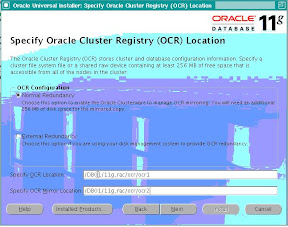
Setup up location of OCR & Voting disk files. For test purposes I used the same mount point with different folders for each e.g.
/DB01/ocr
/DB01/voting_disk
Now run the cluster verify utility to do a pre-check before the cluster installation.
[oracle@oradbdev01 clusterware]$ ./runcluvfy.sh stage -pre crsinst -n oradbdev01,oradbdev02 -verbose
Performing pre-checks for cluster services setup
Checking node reachability...
Check: Node reachability from node "oradbdev01"
Destination Node Reachable?
------------------------------------ ------------------------
oradbdev01 yes
oradbdev02 yes
Result: Node reachability check passed from node "oradbdev01".
Checking user equivalence...
Check: User equivalence for user "oracle"
Node Name Comment
------------------------------------ ------------------------
oradbdev02 passed
oradbdev01 passed
Result: User equivalence check passed for user "oracle".
Checking administrative privileges...
Check: Existence of user "oracle"
Node Name User Exists Comment
------------ ------------------------ ------------------------
oradbdev02 yes passed
oradbdev01 yes passed
Result: User existence check passed for "oracle".
Check: Existence of group "oinstall"
Node Name Status Group ID
------------ ------------------------ ------------------------
oradbdev02 exists 503
oradbdev01 exists 503
Result: Group existence check passed for "oinstall".
Check: Membership of user "oracle" in group "oinstall" [as Primary]
Node Name User Exists Group Exists User in Group Primary Comment
---------------- ------------ ------------ ------------ ------------ ------------
oradbdev02 yes yes yes no failed
oradbdev01 yes yes yes no failed
Result: Membership check for user "oracle" in group "oinstall" [as Primary] failed.
Administrative privileges check failed.
Checking node connectivity...
Interface information for node "oradbdev02"
Interface Name IP Address Subnet Subnet Gateway Default Gateway Hardware Address
---------------- ------------ ------------ ------------ ------------ ------------
eth0 10.66.81.62 10.66.80.0 0.0.0.0 10.66.80.1 00:1B:78:DF:CC:9C
eth1 192.168.0.62 192.168.0.0 0.0.0.0 10.66.80.1 00:1B:78:DF:CC:84
Interface information for node "oradbdev01"
Interface Name IP Address Subnet Subnet Gateway Default Gateway Hardware Address
---------------- ------------ ------------ ------------ ------------ ------------
eth0 10.66.81.61 10.66.80.0 0.0.0.0 10.66.80.1 00:1B:78:DF:AC:0E
eth1 192.168.0.61 192.168.0.0 0.0.0.0 10.66.80.1 00:1B:78:DF:AC:08
Check: Node connectivity of subnet "10.66.80.0"
Source Destination Connected?
------------------------------ ------------------------------ ----------------
oradbdev02:eth0 oradbdev01:eth0 yes
Result: Node connectivity check passed for subnet "10.66.80.0" with node(s) oradbdev02,oradbdev01.
Check: Node connectivity of subnet "192.168.0.0"
Source Destination Connected?
------------------------------ ------------------------------ ----------------
oradbdev02:eth1 oradbdev01:eth1 yes
Result: Node connectivity check passed for subnet "192.168.0.0" with node(s) oradbdev02,oradbdev01.
Interfaces found on subnet "10.66.80.0" that are likely candidates for VIP:
oradbdev02 eth0:10.66.81.62
oradbdev01 eth0:10.66.81.61
Interfaces found on subnet "192.168.0.0" that are likely candidates for a private interconnect:
oradbdev02 eth1:192.168.0.62
oradbdev01 eth1:192.168.0.61
Result: Node connectivity check passed.
Checking system requirements for 'crs'...
Check: Total memory
Node Name Available Required Comment
------------ ------------------------ ------------------------ ----------
oradbdev02 7.79GB (8164980KB) 1GB (1048576KB) passed
oradbdev01 7.79GB (8164980KB) 1GB (1048576KB) passed
Result: Total memory check passed.
Check: Free disk space in "/tmp" dir
Node Name Available Required Comment
------------ ------------------------ ------------------------ ----------
oradbdev02 199.68GB (209378492KB) 400MB (409600KB) passed
oradbdev01 216.94GB (227478076KB) 400MB (409600KB) passed
Result: Free disk space check passed.
Check: Swap space
Node Name Available Required Comment
------------ ------------------------ ------------------------ ----------
oradbdev02 15.81GB (16579072KB) 1.5GB (1572864KB) passed
oradbdev01 15.8GB (16571036KB) 1.5GB (1572864KB) passed
Result: Swap space check passed.
Check: System architecture
Node Name Available Required Comment
------------ ------------------------ ------------------------ ----------
oradbdev02 x86_64 x86_64 passed
oradbdev01 x86_64 x86_64 passed
Result: System architecture check passed.
Check: Kernel version
Node Name Available Required Comment
------------ ------------------------ ------------------------ ----------
oradbdev02 2.6.9-55.ELsmp 2.6.9-11.EL passed
oradbdev01 2.6.9-55.ELsmp 2.6.9-11.EL passed
Result: Kernel version check passed.
Check: Package existence for "make-3.80"
Node Name Status Comment
------------------------------ ------------------------------ ----------------
oradbdev02 make-3.80-6.EL4 passed
oradbdev01 make-3.80-6.EL4 passed
Result: Package existence check passed for "make-3.80".
Check: Package existence for "binutils-2.15.92.0.2"
Node Name Status Comment
------------------------------ ------------------------------ ----------------
oradbdev02 binutils-2.15.92.0.2-22 passed
oradbdev01 binutils-2.15.92.0.2-22 passed
Result: Package existence check passed for "binutils-2.15.92.0.2".
Check: Package existence for "gcc-3.4.5"
Node Name Status Comment
------------------------------ ------------------------------ ----------------
oradbdev02 gcc-3.4.6-9 passed
oradbdev01 gcc-3.4.6-8 passed
Result: Package existence check passed for "gcc-3.4.5".
Check: Package existence for "libaio-0.3.105"
Node Name Status Comment
------------------------------ ------------------------------ ----------------
oradbdev02 libaio-0.3.105-2 passed
oradbdev01 libaio-0.3.105-2 passed
Result: Package existence check passed for "libaio-0.3.105".
Check: Package existence for "libaio-0.3.105"
Node Name Status Comment
------------------------------ ------------------------------ ----------------
oradbdev02 libaio-0.3.105-2 passed
oradbdev01 libaio-0.3.105-2 passed
Result: Package existence check passed for "libaio-0.3.105".
Check: Package existence for "libaio-devel-0.3.105"
Node Name Status Comment
------------------------------ ------------------------------ ----------------
oradbdev02 libaio-devel-0.3.105-2 passed
oradbdev01 libaio-devel-0.3.105-2 passed
Result: Package existence check passed for "libaio-devel-0.3.105".
Check: Package existence for "libstdc++-3.4.5"
Node Name Status Comment
------------------------------ ------------------------------ ----------------
oradbdev02 libstdc++-3.4.6-9 passed
oradbdev01 libstdc++-3.4.6-8 passed
Result: Package existence check passed for "libstdc++-3.4.5".
Check: Package existence for "libstdc++-3.4.5"
Node Name Status Comment
------------------------------ ------------------------------ ----------------
oradbdev02 libstdc++-3.4.6-9 passed
oradbdev01 libstdc++-3.4.6-8 passed
Result: Package existence check passed for "libstdc++-3.4.5".
Check: Package existence for "elfutils-libelf-devel-0.97"
Node Name Status Comment
------------------------------ ------------------------------ ----------------
oradbdev02 elfutils-libelf-devel-0.97.1-5 passed
oradbdev01 elfutils-libelf-devel-0.97.1-4 passed
Result: Package existence check passed for "elfutils-libelf-devel-0.97".
Check: Package existence for "sysstat-5.0.5"
Node Name Status Comment
------------------------------ ------------------------------ ----------------
oradbdev02 sysstat-5.0.5-16.rhel4 passed
oradbdev01 sysstat-5.0.5-14.rhel4 passed
Result: Package existence check passed for "sysstat-5.0.5".
Check: Package existence for "libgcc-3.4.5"
Node Name Status Comment
------------------------------ ------------------------------ ----------------
oradbdev02 libgcc-3.4.6-8 passed
oradbdev01 libgcc-3.4.6-8 passed
Result: Package existence check passed for "libgcc-3.4.5".
Check: Package existence for "libgcc-3.4.5"
Node Name Status Comment
------------------------------ ------------------------------ ----------------
oradbdev02 libgcc-3.4.6-9 passed
oradbdev01 libgcc-3.4.6-8 passed
Result: Package existence check passed for "libgcc-3.4.5".
Check: Package existence for "libstdc++-devel-3.4.5"
Node Name Status Comment
------------------------------ ------------------------------ ----------------
oradbdev02 libstdc++-devel-3.4.6-9 passed
oradbdev01 libstdc++-devel-3.4.6-8 passed
Result: Package existence check passed for "libstdc++-devel-3.4.5".
Check: Package existence for "elfutils-libelf-0.97"
Node Name Status Comment
------------------------------ ------------------------------ ----------------
oradbdev02 elfutils-libelf-0.97.1-4elfutils-libelf-0.97.1-5 passed
oradbdev01 elfutils-libelf-0.97.1-4 passed
Result: Package existence check passed for "elfutils-libelf-0.97".
Check: Package existence for "glibc-2.3.4-2.19"
Node Name Status Comment
------------------------------ ------------------------------ ----------------
oradbdev02 failed
oradbdev01 failed
Result: Package existence check failed for "glibc-2.3.4-2.19".
Check: Package existence for "glibc-2.3.4-2.19"
Node Name Status Comment
------------------------------ ------------------------------ ----------------
oradbdev02 glibc-2.3.4-2.36 passed
oradbdev01 glibc-2.3.4-2.36 passed
Result: Package existence check passed for "glibc-2.3.4-2.19".
Check: Package existence for "glibc-common-2.3.4"
Node Name Status Comment
------------------------------ ------------------------------ ----------------
oradbdev02 glibc-common-2.3.4-2.36 passed
oradbdev01 glibc-common-2.3.4-2.36 passed
Result: Package existence check passed for "glibc-common-2.3.4".
Check: Package existence for "glibc-devel-2.3.4"
Node Name Status Comment
------------------------------ ------------------------------ ----------------
oradbdev02 glibc-devel-2.3.4-2.36 passed
oradbdev01 glibc-devel-2.3.4-2.36 passed
Result: Package existence check passed for "glibc-devel-2.3.4".
Check: Package existence for "glibc-devel-2.3.4"
Node Name Status Comment
------------------------------ ------------------------------ ----------------
oradbdev02 glibc-devel-2.3.4-2.36 passed
oradbdev01 glibc-devel-2.3.4-2.36 passed
Result: Package existence check passed for "glibc-devel-2.3.4".
Check: Package existence for "gcc-c++-3.4.5"
Node Name Status Comment
------------------------------ ------------------------------ ----------------
oradbdev02 gcc-c++-3.4.6-9 passed
oradbdev01 gcc-c++-3.4.6-8 passed
Result: Package existence check passed for "gcc-c++-3.4.5".
Check: Package existence for "compat-libstdc++-33-3.2.3"
Node Name Status Comment
------------------------------ ------------------------------ ----------------
oradbdev02 compat-libstdc++-33-3.2.3-47.3 passed
oradbdev01 compat-libstdc++-33-3.2.3-47.3 passed
Result: Package existence check passed for "compat-libstdc++-33-3.2.3".
Check: Package existence for "compat-libstdc++-33-3.2.3"
Node Name Status Comment
------------------------------ ------------------------------ ----------------
oradbdev02 compat-libstdc++-33-3.2.3-47.3 passed
oradbdev01 compat-libstdc++-33-3.2.3-47.3 passed
Result: Package existence check passed for "compat-libstdc++-33-3.2.3".
Check: Group existence for "dba"
Node Name Status Comment
------------ ------------------------ ------------------------
oradbdev02 exists passed
oradbdev01 exists passed
Result: Group existence check passed for "dba".
Check: Group existence for "oinstall"
Node Name Status Comment
------------ ------------------------ ------------------------
oradbdev02 exists passed
oradbdev01 exists passed
Result: Group existence check passed for "oinstall".
Check: User existence for "nobody"
Node Name Status Comment
------------ ------------------------ ------------------------
oradbdev02 exists passed
oradbdev01 exists passed
Result: User existence check passed for "nobody".
System requirement failed for 'crs'
Pre-check for cluster services setup was unsuccessful on all the nodes.
The check has failed for me for checking if oracle users primary group is "oinstall". I am using dba as the groups. Hence I am omitting this error.
Now we are all set to start the OUI
[oracle@oradbdev01 clusterware]$ /home/oracle/software/11g/Cluster/clusterware/runInstaller
Now follow the screen shots:
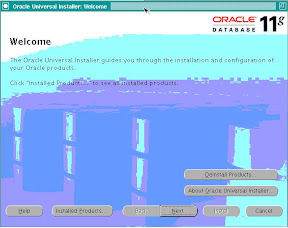
The Welcome Screen - Press Next:
 |
| From For Blog |
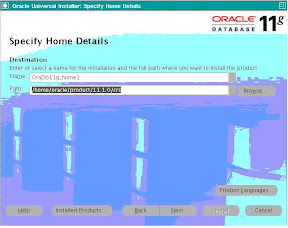
Select the location for your CRS_HOME, where the crs will get installed and Press Next:
 |
| From For Blog |
Oracle does some pre-check, resolve any issues and Press Next:
 |
| From For Blog |
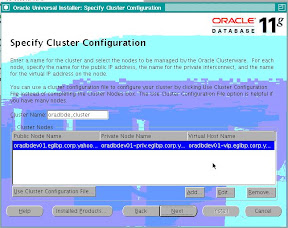
Add information about the cluster nodes and the Press Next:
 |
| From For Blog |
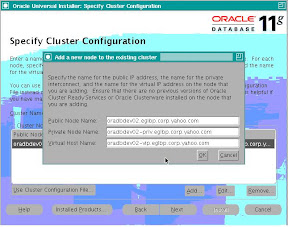
Example of how to add information:
 |
| From For Blog |
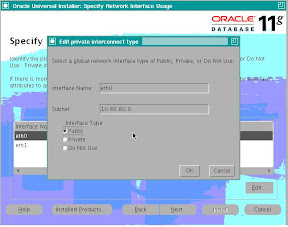
Select the Public and Private IP address subnets and Press Next:
 |
| From For Blog |
Specify OCR Location and Press Next:
 |
| From For Blog |
Specify Voting Disk Location and Press Next:
|
| From For Blog |
Installation summary window, check for the remote node and Press Install:
 |
| From For Blog |
Installation in Progress:
|
| From For Blog |
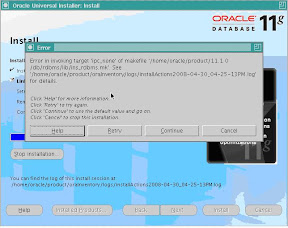
I received this error as I had not setup my environment properly before starting the installation.
Error from make.log
/usr/bin/make -f ins_rdbms.mk ipc_none ORACLE_HOME=/home/oracle/product/11.1.0/db//home/oracle/product/11.1.0/db/rdbms/lib/ins_rdbms.mk:2: /home/oracle/product/11.1.0/db/rdbms/lib/env_rdbms.mk: No such file or directory
make: *** No rule to make target `/home/oracle/product/11.1.0/db/rdbms/lib/env_rdbms.mk'. Stop.
I stopped the installation and setup ORACLE_HOME again and started the install again.
#
# An unexpected error has been detected by HotSpot Virtual Machine:
#
# SIGSEGV (0xb) at pc=0x0000002a9591bb92, pid=8270, tid=1094084960
#
# Java VM: Java HotSpot(TM) 64-Bit Server VM (1.5.0_11-b03 mixed mode)
# Problematic frame:
# V [libjvm.so+0x3a4b92]
#
# An error report file with more information is saved as hs_err_pid8270.log
#
# If you would like to submit a bug report, please visit:
# http://java.sun.com/webapps/bugreport/crash.jsp
Again at this point my $PATH showed wrong path. Hence remove unnecessary entries from $PATH and restarted installation and it worked this time.
 |
| From For Blog |
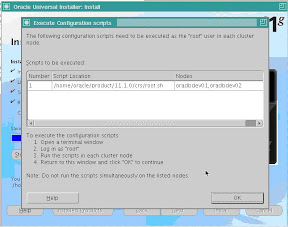
Run root.sh on both the nodes:
 |
| From For Blog |
[oracle@oradbdev01 crs]$ sudo ./root.sh
Password:
WARNING: directory '/home/oracle/product/11.1.0' is not owned by root
WARNING: directory '/home/oracle/product' is not owned by root
WARNING: directory '/home/oracle' is not owned by root
Checking to see if Oracle CRS stack is already configured
Setting the permissions on OCR backup directory
Setting up Network socket directories
PROT-1: Failed to initialize ocrconfig
Failed to upgrade Oracle Cluster Registry configuration
There were permission problems on the folders in node 2.
Resolved the issue and restarted the installation.
Node 1:
Running root.sh:
[oracle@oradbdev01 crs]$ sudo ./root.sh
WARNING: directory '/home/oracle/product/11.1.0' is not owned by root
WARNING: directory '/home/oracle/product' is not owned by root
WARNING: directory '/home/oracle' is not owned by root
Checking to see if Oracle CRS stack is already configured
/etc/oracle does not exist. Creating it now.
Setting the permissions on OCR backup directory
Setting up Network socket directories
Oracle Cluster Registry configuration upgraded successfully
The directory '/home/oracle/product/11.1.0' is not owned by root. Changing owner to root
The directory '/home/oracle/product' is not owned by root. Changing owner to root
The directory '/home/oracle' is not owned by root. Changing owner to root
Successfully accumulated necessary OCR keys.
Using ports: CSS=49895 CRS=49896 EVMC=49898 and EVMR=49897.
node
node 1: oradbdev01 oradbdev01-priv oradbdev01
node 2: oradbdev02 oradbdev02-priv oradbdev02
Creating OCR keys for user 'root', privgrp 'root'..
Operation successful.
Now formatting voting device: /DB01/11g_rac/voting_disk/vote1
Now formatting voting device: /DB01/11g_rac/voting_disk/vote2
Now formatting voting device: /DB01/11g_rac/voting_disk/vote3
Format of 3 voting devices complete.
Startup will be queued to init within 30 seconds.
Adding daemons to inittab
Expecting the CRS daemons to be up within 600 seconds.
Cluster Synchronization Services is active on these nodes.
oradbdev01
Cluster Synchronization Services is inactive on these nodes.
oradbdev02
Local node checking complete. Run root.sh on remaining nodes to start CRS daemons.
Node 2:
[oracle@oradbdev02 crs]$ sudo ./root.sh
Password:
WARNING: directory '/home/oracle/product/11.1.0' is not owned by root
WARNING: directory '/home/oracle/product' is not owned by root
WARNING: directory '/home/oracle' is not owned by root
Checking to see if Oracle CRS stack is already configured
/etc/oracle does not exist. Creating it now.
Setting the permissions on OCR backup directory
Setting up Network socket directories
Oracle Cluster Registry configuration upgraded successfully
The directory '/home/oracle/product/11.1.0' is not owned by root. Changing owner to root
The directory '/home/oracle/product' is not owned by root. Changing owner to root
The directory '/home/oracle' is not owned by root. Changing owner to root
clscfg: EXISTING configuration version 4 detected.
clscfg: version 4 is 11 Release 1.
Successfully accumulated necessary OCR keys.
Using ports: CSS=49895 CRS=49896 EVMC=49898 and EVMR=49897.
node
node 1: oradbdev01 oradbdev01-priv oradbdev01
node 2: oradbdev02 oradbdev02-priv oradbdev02
clscfg: Arguments check out successfully.
NO KEYS WERE WRITTEN. Supply -force parameter to override.
-force is destructive and will destroy any previous cluster
configuration.
Oracle Cluster Registry for cluster has already been initialized
Startup will be queued to init within 30 seconds.
Adding daemons to inittab
Expecting the CRS daemons to be up within 600 seconds.
Cluster Synchronization Services is active on these nodes.
oradbdev01
oradbdev02
Cluster Synchronization Services is active on all the nodes.
Waiting for the Oracle CRSD and EVMD to start
Oracle CRS stack installed and running under init(1M)
Running vipca(silent) for configuring nodeapps
Creating VIP application resource on (2) nodes...
Creating GSD application resource on (2) nodes...
Creating ONS application resource on (2) nodes...
Starting VIP application resource on (2) nodes...
Starting GSD application resource on (2) nodes...
Starting ONS application resource on (2) nodes...
Done.
Oracle Run vipca and other configurations: Press Next after it completes:
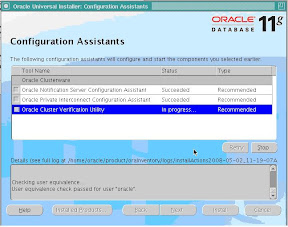 |
| From For Blog |
Final Window - Installation Completed!!! - Press Exit:
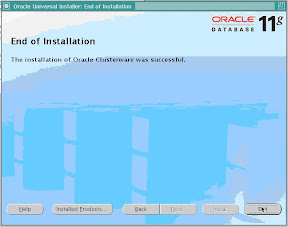 |
| From For Blog |
[oracle@oradbdev01 bin]$ ./crsctl check crs
Cluster Synchronization Services appears healthy
Cluster Ready Services appears healthy
Event Manager appears healthy
[oracle@oradbdev02 bin]$ ./crsctl check crs
Cluster Synchronization Services appears healthy
Cluster Ready Services appears healthy
Event Manager appears healthy
This shows that crs installation was successful on both the nodes!!
Monday, April 21, 2008
10.2.0.1 CRS Installation and upgrade to 10.2.0.3 for RAC
Download oracle crs software from http://www.oracle.com/technology/software/index.html location. For this document we will use oracle 10.2.0.1 crs software.
i.e. 10201_clusterware_linux_x86_64.cpio
##cpio –idmv <>
[oracle@ac-oracle-001]~/stage/clusterware/cluvfy% ./runcluvfy.sh stage -pre crsinst -n -oracle-001,ac-oracle-002
Performing pre-checks for cluster services setup
Checking node reachability...
Node reachability check passed from node "ac-oracle-001".
Checking user equivalence...
User equivalence check passed for user "oracle".
Checking administrative privileges...
User existence check passed for "oracle".
Group existence check failed for "oinstall".
Check failed on nodes:
ac-oracle-002,ac-oracle-001
Administrative privileges check failed.
Checking node connectivity...
Node connectivity check passed for subnet "76.13.224.64" with node(s) ac-oracle-002,ac-oracle-001.
Node connectivity check passed for subnet "10.128.159.0" with node(s) ac-oracle-002,ac-oracle-001.
Suitable interfaces for VIP on subnet "76.13.224.64":
ac-oracle-002 eth0:76.13.224.119 eth0:76.13.224.111
ac-oracle-001 eth0:76.13.224.120 eth0:76.13.224.112
Suitable interfaces for the private interconnect on subnet "10.128.159.0":
ac-oracle-002 ib1:10.128.159.53
ac-oracle-001 ib1:10.128.159.52
Node connectivity check passed.
Checking system requirements for 'crs'...
Total memory check passed.
Free disk space check passed.
Swap space check passed.
System architecture check passed.
Kernel version check passed.
Package existence check passed for "binutils-2.15.92.0.2-13".
Group existence check passed for "dba".
Group existence check failed for "oinstall".
Check failed on nodes:
ac-oracle-002,ac-oracle-001
User existence check passed for "nobody".
System requirement failed for 'crs'
Pre-check for cluster services setup was unsuccessful on all the nodes.
As I am not using oinstall group, I am going to ignore the error for the oinstall group not existing.
Now invoke the installer:
[oracle@ac-oracle-001]~/stage/clusterware%./runInstaller
This is give you the welcome screen, please press next.
Then:
 |
| From For Blog |
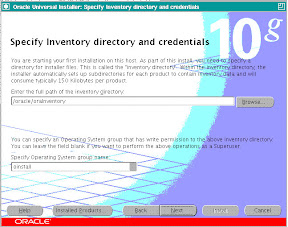
Select the Ora Inventory location and "dba" as the group for installation. And press Next:
 |
| From For Blog |
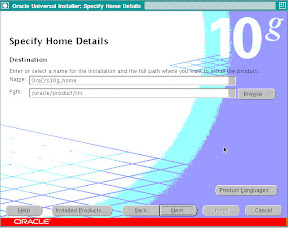
Select location of CRS_HOME and press Next:
 |
| From For Blog |
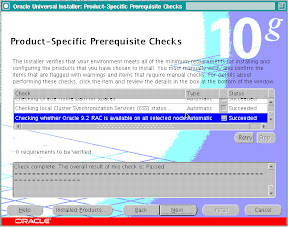
This screen shows that the installer is running a check from pre-requisites.
This should complete without error, check for warnings if any. I received a warning for Swap space, so I continued the installation, deciding to take care of the swap space latter. Press Next:
 |
| From For Blog |
Add node information in this window:
|
| From For Blog |
Specify the Pulic Name, Private Name and VIP Name for the various RAC nodes:
|
| From For Blog |
Press Next:
 |
| From For Blog |
I received the above error, this happened as the user equivalence was not setup properly. I rectified the problem and proceeded.
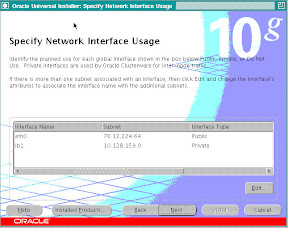
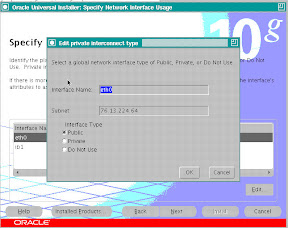 |
| From For Blog |
This shows the details for the Public and Private IP, Please verify and see if the installer has got the right information about the IP addresses.
 |
| From For Blog |
Press Next:
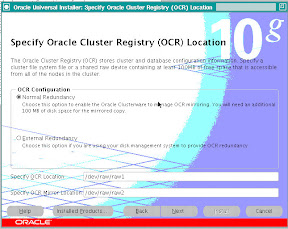 |
| From For Blog |
Specify the location of OCR files and Press Next:
 |
| From For Blog |
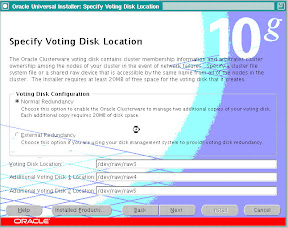
Specify the location of Voting Disk Files and Press Next:
Next you will see the install summary page, please press INSTALL on this page.
|
| From For Blog |
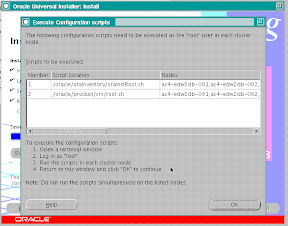
After the installation completes you will be asked to run the orainstRoot.sh and root.sh as root user.
 |
| From For Blog |
Before running the root.sh & orainstRoot.sh download and apply patch 4679769
[oracle@ac-oracle-001]~/stage/clusterware/patch/4679769% cp -p /oracle/product/crs/bin/clsfmt.bin /oracle/product/crs/bin/clsfmt.bin.bak
[oracle@ac-oracle-001]~/stage/clusterware/patch/4679769%
[oracle@ac-oracle-001]~/stage/clusterware/patch/4679769% ls -l /oracle/product/crs/bin/clsfmt*
-rwxr-xr-x 1 oracle dba 1676 Apr 18 08:36 /oracle/product/crs/bin/clsfmt
-rwxr-xr-x 1 oracle dba 687684 Oct 20 2005 /oracle/product/crs/bin/clsfmt.bin
-rwxr-xr-x 1 oracle dba 687684 Oct 20 2005 /oracle/product/crs/bin/clsfmt.bin.bak
[oracle@ac-oracle-001]~/stage/clusterware/patch/4679769%
[oracle@ac-oracle-001]~/stage/clusterware/patch/4679769% cp clsfmt.bin /oracle/product/crs/bin/clsfmt.bin
[oracle@ac-oracle-001]~/stage/clusterware/patch/4679769%
[oracle@ac-oracle-001]~/stage/clusterware/patch/4679769% chmod 755 /oracle/product/crs/bin/clsfmt.bin
[oracle@ac-oracle-001]~/stage/clusterware/patch/4679769%
[oracle@ac-oracle-001]~/stage/clusterware/patch/4679769% ls -lart /oracle/product/crs/bin/clsfmt.bi*
-rwxr-xr-x 1 oracle dba 687684 Oct 20 2005 /oracle/product/crs/bin/clsfmt.bin.bak
-rwxr-xr-x 1 oracle dba 687320 Apr 18 08:45 /oracle/product/crs/bin/clsfmt.bin
[oracle@ac-oracle-001]~/stage/clusterware/patch/4679769%
[oracle@ac-oracle-001]~/oraInventory% sudo ./orainstRoot.sh
Password:
Changing permissions of /oracle/oraInventory to 770.
Changing groupname of /oracle/oraInventory to dba.
The execution of the script is complete
[oracle@ac-oracle-001]~/oraInventory% cd
[oracle@ac-oracle-001]~% cd product/crs
[oracle@ac-oracle-001]~/product/crs% sudo ./root.sh
WARNING: directory '/oracle/product' is not owned by root
WARNING: directory '/' is not owned by root
Checking to see if Oracle CRS stack is already configured
/etc/oracle does not exist. Creating it now.
Setting the permissions on OCR backup directory
Setting up NS directories
Oracle Cluster Registry configuration upgraded successfully
WARNING: directory '/oracle/product' is not owned by root
WARNING: directory '/' is not owned by root
Successfully accumulated necessary OCR keys.
Using ports: CSS=49895 CRS=49896 EVMC=49898 and EVMR=49897.
node
node 1: ac-oracle-001 ac-oracle-001-i ac-oracle-001
node 2: ac-oracle-002 ac-oracle-002-i ac-oracle-002
Creating OCR keys for user 'root', privgrp 'root'..
Operation successful.
Now formatting voting device: /dev/raw/raw3
Now formatting voting device: /dev/raw/raw4
Now formatting voting device: /dev/raw/raw5
Format of 3 voting devices complete.
Startup will be queued to init within 90 seconds.
Adding daemons to inittab
Expecting the CRS daemons to be up within 600 seconds.
CSS is active on these nodes.
ac-oracle-001
CSS is inactive on these nodes.
ac-oracle-002
Local node checking complete.
Run root.sh on remaining nodes to start CRS daemons.
These 2 scripts need to be run on all RAC nodes.
These format and initializes the OCR & Voting Disks.
After the root.sh has completed successfully, the crs would come up on that node.
This completes the 10.2.0.1 CRS Installation.
To upgrade the same to 10.2.0.3 download the patch 5337014, use the runInstaller provided in this patch-set to upgrade the CRS home to 10.2.0.3
The most important step is to run the root102.sh after the upgrade installer completes, you have to run this on all the RAC nodes:
[oracle@ac-oracle-001]~% cd product/crs/install
[oracle@ac-oracle-001]~/product/crs/install% ls -lrt
total 168
-rwxr-xr-x 1 oracle dba 0 Feb 23 2005 install.incl
-rwxr-xr-x 1 oracle dba 38 Apr 19 2005 install.excl
-rw-rw---- 1 oracle dba 2800 Jun 7 2005 templocal
-r-xr-xr-x 1 oracle dba 4150 Aug 11 2005 rootaddnode.sbs
-rwxr-xr-x 1 oracle dba 1092 Oct 18 2005 cmdllroot.sh
-rw-rw---- 1 oracle dba 9625 Apr 18 08:36 rootlocaladd
-r-xr-xr-x 1 oracle dba 17029 Apr 18 08:36 rootupgrade
-r-xr-xr-x 1 oracle dba 3580 Apr 18 08:36 rootinstall
-r-xr-xr-x 1 oracle dba 12072 Apr 18 08:36 rootdelete.sh
-r-xr-xr-x 1 oracle dba 3918 Apr 18 08:36 rootdeletenode.sh
-r-xr-xr-x 1 oracle dba 8154 Apr 18 08:36 rootdeinstall.sh
-r-xr-xr-x 1 oracle dba 34063 Apr 18 08:36 rootconfig
-rwxr-xr-x 1 oracle dba 4570 Apr 18 08:36 preupdate.sh
-rw-rw---- 1 oracle dba 1760 Apr 18 08:36 paramfile.crs
-rw-rw---- 1 oracle dba 4065 Apr 18 08:36 make.log
-rw-rw---- 1 oracle dba 32 Apr 18 08:36 cluster.ini
-rw-rw---- 1 oracle dba 177 Apr 18 08:37 envVars.properties
-rwxr-xr-x 1 oracle dba 23126 Apr 18 11:36 root102.sh
drwxr-xr-x 32 oracle dba 4096 Apr 18 11:39 patch102
[oracle@ac-oracle-001]~/product/crs/install% sudo ./root102.sh
Password:
Creating pre-patch directory for saving pre-patch clusterware files
Completed patching clusterware files to /oracle/product/crs
Relinking some shared libraries.
Relinking of patched files is complete.
WARNING: directory '/oracle/product' is not owned by root
Preparing to recopy patched init and RC scripts.
Recopying init and RC scripts.
Startup will be queued to init within 30 seconds.
Starting up the CRS daemons.
Waiting for the patched CRS daemons to start.
This may take a while on some systems.
.
10203 patch successfully applied.
clscfg: EXISTING configuration version 3 detected.
clscfg: version 3 is 10G Release 2.
Successfully accumulated necessary OCR keys.
Using ports: CSS=49895 CRS=49896 EVMC=49898 and EVMR=49897.
node
node 8: ac-oracle-008 ac-oracle-008-i ac-oracle-008
Creating OCR keys for user 'root', privgrp 'root'..
Operation successful.
clscfg -upgrade completed successfully
[oracle@ac-oracle-008]~/product/crs/install% cd ../bin
[oracle@ac-oracle-008]~/product/crs/bin% ./crsctl query crs softwareversion
CRS software version on node [ac-oracle-001] is [10.2.0.3.0]
