
Oracle Global Support strongly recommends that you use Red Hat Enterprise Linux ES/AS 4 (update 3 or higher). This is kernel 2.6.9-34 or greater.
Requried RPMS: (check details on Metalink Note:437123.1)
compat-libstdc++-33-3.2.3.x86_64.rpm
elfutils-libelf-devel-0.97-5.x86_64.rpm
glibc-devel-2.3.4-2.19.x86_64.rpm
glibc-devel-2.3.4-2.19.i386.rpm (32-Bit)
gcc-3.4.5-2.x86_64.rpm
libstdc++-devel-3.4.5-2.x86_64.rpm
gcc-c++-3.4.5-2.x86_64.rpm
libaio-0.3.105-2.x86_64.rpm
libaio-0.3.105-2.i386.rpm (32-Bit)
libaio-devel-0.3.105-2.x86_64.rpm
sysstat-5.0.5-7.rhel4.x86_64.rpm
glibc-headers-2.3.4-2.19.x86_64.rpm
glibc-kernheaders-2.4-9.1.98.EL.x86_64.rpm
To query rpm installed in your system:
rpm -qa --queryformat "%{NAME}-%{VERSION}-%{RELEASE} (%{ARCH})\n" | grep compat-libstdc++
Sample sysctl.conf
kernel.shmall = 2097152
kernel.shmmax = 2147483648
kernel.shmmni = 4096
kernel.sem = 250 32000 100 128
fs.file-max = 65536
net.ipv4.ip_local_port_range = 1024 65000
net.core.rmem_default=262144
net.core.rmem_max=262144
net.core.wmem_default=262144
net.core.wmem_max=262144
net.ipv4.tcp_wmem = 262144 262144 262144
net.ipv4.tcp_rmem = 4194304 4194304 4194304
Add the following settings to /etc/security/limits.conf
oracle soft nproc 2047
oracle hard nproc 16384
oracle soft nofile 1024
oracle hard nofile 65536
Add or edit the following line in the /etc/pam.d/login file, if it does not already exist:
session required pam_limits.so
Add the following lines to /etc/profile:
if [ $USER = "oracle" ]; then
if [ $SHELL = "/bin/ksh" ]; then
ulimit -p 16384
ulimit -n 65536
else
ulimit -u 16384 -n 65536
fi
fi
This is how the /etc/hosts file look like:
[oracle@oradbdev02 ~]$ more /etc/hosts
# Do not remove the following line, or various programs
# that require network functionality will fail.
#127.0.0.1 localhost.localdomain localhost
127.0.0.1 oradbdev02.xxxx.com oradbdev02
# Public
10.66.81.61 oradbdev01.xxxx.com oradbdev01
10.66.81.62 oradbdev02.xxxx.com oradbdev02
#Private
192.168.0.61 oradbdev01-priv.xxxx.com oradbdev01-priv
192.168.0.62 oradbdev02-priv.xxxx.com oradbdev02-priv
#Virtual
10.66.81.198 oradbdev01-vip.xxxx.com oradbdev01-vip
10.66.81.199 oradbdev02-vip.xxxx.com oradbdev02-vip
Imp metalink notes to look at before installation: 452780.1.
Setup user equivalence between the rac nodes.
Check that oracle is able to ssh between the rac servers without having to type the password.
Setup up location of OCR & Voting disk files. For test purposes I used the same mount point with different folders for each e.g.
/DB01/ocr
/DB01/voting_disk
Now run the cluster verify utility to do a pre-check before the cluster installation.
[oracle@oradbdev01 clusterware]$ ./runcluvfy.sh stage -pre crsinst -n oradbdev01,oradbdev02 -verbose
Performing pre-checks for cluster services setup
Checking node reachability...
Check: Node reachability from node "oradbdev01"
Destination Node Reachable?
------------------------------------ ------------------------
oradbdev01 yes
oradbdev02 yes
Result: Node reachability check passed from node "oradbdev01".
Checking user equivalence...
Check: User equivalence for user "oracle"
Node Name Comment
------------------------------------ ------------------------
oradbdev02 passed
oradbdev01 passed
Result: User equivalence check passed for user "oracle".
Checking administrative privileges...
Check: Existence of user "oracle"
Node Name User Exists Comment
------------ ------------------------ ------------------------
oradbdev02 yes passed
oradbdev01 yes passed
Result: User existence check passed for "oracle".
Check: Existence of group "oinstall"
Node Name Status Group ID
------------ ------------------------ ------------------------
oradbdev02 exists 503
oradbdev01 exists 503
Result: Group existence check passed for "oinstall".
Check: Membership of user "oracle" in group "oinstall" [as Primary]
Node Name User Exists Group Exists User in Group Primary Comment
---------------- ------------ ------------ ------------ ------------ ------------
oradbdev02 yes yes yes no failed
oradbdev01 yes yes yes no failed
Result: Membership check for user "oracle" in group "oinstall" [as Primary] failed.
Administrative privileges check failed.
Checking node connectivity...
Interface information for node "oradbdev02"
Interface Name IP Address Subnet Subnet Gateway Default Gateway Hardware Address
---------------- ------------ ------------ ------------ ------------ ------------
eth0 10.66.81.62 10.66.80.0 0.0.0.0 10.66.80.1 00:1B:78:DF:CC:9C
eth1 192.168.0.62 192.168.0.0 0.0.0.0 10.66.80.1 00:1B:78:DF:CC:84
Interface information for node "oradbdev01"
Interface Name IP Address Subnet Subnet Gateway Default Gateway Hardware Address
---------------- ------------ ------------ ------------ ------------ ------------
eth0 10.66.81.61 10.66.80.0 0.0.0.0 10.66.80.1 00:1B:78:DF:AC:0E
eth1 192.168.0.61 192.168.0.0 0.0.0.0 10.66.80.1 00:1B:78:DF:AC:08
Check: Node connectivity of subnet "10.66.80.0"
Source Destination Connected?
------------------------------ ------------------------------ ----------------
oradbdev02:eth0 oradbdev01:eth0 yes
Result: Node connectivity check passed for subnet "10.66.80.0" with node(s) oradbdev02,oradbdev01.
Check: Node connectivity of subnet "192.168.0.0"
Source Destination Connected?
------------------------------ ------------------------------ ----------------
oradbdev02:eth1 oradbdev01:eth1 yes
Result: Node connectivity check passed for subnet "192.168.0.0" with node(s) oradbdev02,oradbdev01.
Interfaces found on subnet "10.66.80.0" that are likely candidates for VIP:
oradbdev02 eth0:10.66.81.62
oradbdev01 eth0:10.66.81.61
Interfaces found on subnet "192.168.0.0" that are likely candidates for a private interconnect:
oradbdev02 eth1:192.168.0.62
oradbdev01 eth1:192.168.0.61
Result: Node connectivity check passed.
Checking system requirements for 'crs'...
Check: Total memory
Node Name Available Required Comment
------------ ------------------------ ------------------------ ----------
oradbdev02 7.79GB (8164980KB) 1GB (1048576KB) passed
oradbdev01 7.79GB (8164980KB) 1GB (1048576KB) passed
Result: Total memory check passed.
Check: Free disk space in "/tmp" dir
Node Name Available Required Comment
------------ ------------------------ ------------------------ ----------
oradbdev02 199.68GB (209378492KB) 400MB (409600KB) passed
oradbdev01 216.94GB (227478076KB) 400MB (409600KB) passed
Result: Free disk space check passed.
Check: Swap space
Node Name Available Required Comment
------------ ------------------------ ------------------------ ----------
oradbdev02 15.81GB (16579072KB) 1.5GB (1572864KB) passed
oradbdev01 15.8GB (16571036KB) 1.5GB (1572864KB) passed
Result: Swap space check passed.
Check: System architecture
Node Name Available Required Comment
------------ ------------------------ ------------------------ ----------
oradbdev02 x86_64 x86_64 passed
oradbdev01 x86_64 x86_64 passed
Result: System architecture check passed.
Check: Kernel version
Node Name Available Required Comment
------------ ------------------------ ------------------------ ----------
oradbdev02 2.6.9-55.ELsmp 2.6.9-11.EL passed
oradbdev01 2.6.9-55.ELsmp 2.6.9-11.EL passed
Result: Kernel version check passed.
Check: Package existence for "make-3.80"
Node Name Status Comment
------------------------------ ------------------------------ ----------------
oradbdev02 make-3.80-6.EL4 passed
oradbdev01 make-3.80-6.EL4 passed
Result: Package existence check passed for "make-3.80".
Check: Package existence for "binutils-2.15.92.0.2"
Node Name Status Comment
------------------------------ ------------------------------ ----------------
oradbdev02 binutils-2.15.92.0.2-22 passed
oradbdev01 binutils-2.15.92.0.2-22 passed
Result: Package existence check passed for "binutils-2.15.92.0.2".
Check: Package existence for "gcc-3.4.5"
Node Name Status Comment
------------------------------ ------------------------------ ----------------
oradbdev02 gcc-3.4.6-9 passed
oradbdev01 gcc-3.4.6-8 passed
Result: Package existence check passed for "gcc-3.4.5".
Check: Package existence for "libaio-0.3.105"
Node Name Status Comment
------------------------------ ------------------------------ ----------------
oradbdev02 libaio-0.3.105-2 passed
oradbdev01 libaio-0.3.105-2 passed
Result: Package existence check passed for "libaio-0.3.105".
Check: Package existence for "libaio-0.3.105"
Node Name Status Comment
------------------------------ ------------------------------ ----------------
oradbdev02 libaio-0.3.105-2 passed
oradbdev01 libaio-0.3.105-2 passed
Result: Package existence check passed for "libaio-0.3.105".
Check: Package existence for "libaio-devel-0.3.105"
Node Name Status Comment
------------------------------ ------------------------------ ----------------
oradbdev02 libaio-devel-0.3.105-2 passed
oradbdev01 libaio-devel-0.3.105-2 passed
Result: Package existence check passed for "libaio-devel-0.3.105".
Check: Package existence for "libstdc++-3.4.5"
Node Name Status Comment
------------------------------ ------------------------------ ----------------
oradbdev02 libstdc++-3.4.6-9 passed
oradbdev01 libstdc++-3.4.6-8 passed
Result: Package existence check passed for "libstdc++-3.4.5".
Check: Package existence for "libstdc++-3.4.5"
Node Name Status Comment
------------------------------ ------------------------------ ----------------
oradbdev02 libstdc++-3.4.6-9 passed
oradbdev01 libstdc++-3.4.6-8 passed
Result: Package existence check passed for "libstdc++-3.4.5".
Check: Package existence for "elfutils-libelf-devel-0.97"
Node Name Status Comment
------------------------------ ------------------------------ ----------------
oradbdev02 elfutils-libelf-devel-0.97.1-5 passed
oradbdev01 elfutils-libelf-devel-0.97.1-4 passed
Result: Package existence check passed for "elfutils-libelf-devel-0.97".
Check: Package existence for "sysstat-5.0.5"
Node Name Status Comment
------------------------------ ------------------------------ ----------------
oradbdev02 sysstat-5.0.5-16.rhel4 passed
oradbdev01 sysstat-5.0.5-14.rhel4 passed
Result: Package existence check passed for "sysstat-5.0.5".
Check: Package existence for "libgcc-3.4.5"
Node Name Status Comment
------------------------------ ------------------------------ ----------------
oradbdev02 libgcc-3.4.6-8 passed
oradbdev01 libgcc-3.4.6-8 passed
Result: Package existence check passed for "libgcc-3.4.5".
Check: Package existence for "libgcc-3.4.5"
Node Name Status Comment
------------------------------ ------------------------------ ----------------
oradbdev02 libgcc-3.4.6-9 passed
oradbdev01 libgcc-3.4.6-8 passed
Result: Package existence check passed for "libgcc-3.4.5".
Check: Package existence for "libstdc++-devel-3.4.5"
Node Name Status Comment
------------------------------ ------------------------------ ----------------
oradbdev02 libstdc++-devel-3.4.6-9 passed
oradbdev01 libstdc++-devel-3.4.6-8 passed
Result: Package existence check passed for "libstdc++-devel-3.4.5".
Check: Package existence for "elfutils-libelf-0.97"
Node Name Status Comment
------------------------------ ------------------------------ ----------------
oradbdev02 elfutils-libelf-0.97.1-4elfutils-libelf-0.97.1-5 passed
oradbdev01 elfutils-libelf-0.97.1-4 passed
Result: Package existence check passed for "elfutils-libelf-0.97".
Check: Package existence for "glibc-2.3.4-2.19"
Node Name Status Comment
------------------------------ ------------------------------ ----------------
oradbdev02 failed
oradbdev01 failed
Result: Package existence check failed for "glibc-2.3.4-2.19".
Check: Package existence for "glibc-2.3.4-2.19"
Node Name Status Comment
------------------------------ ------------------------------ ----------------
oradbdev02 glibc-2.3.4-2.36 passed
oradbdev01 glibc-2.3.4-2.36 passed
Result: Package existence check passed for "glibc-2.3.4-2.19".
Check: Package existence for "glibc-common-2.3.4"
Node Name Status Comment
------------------------------ ------------------------------ ----------------
oradbdev02 glibc-common-2.3.4-2.36 passed
oradbdev01 glibc-common-2.3.4-2.36 passed
Result: Package existence check passed for "glibc-common-2.3.4".
Check: Package existence for "glibc-devel-2.3.4"
Node Name Status Comment
------------------------------ ------------------------------ ----------------
oradbdev02 glibc-devel-2.3.4-2.36 passed
oradbdev01 glibc-devel-2.3.4-2.36 passed
Result: Package existence check passed for "glibc-devel-2.3.4".
Check: Package existence for "glibc-devel-2.3.4"
Node Name Status Comment
------------------------------ ------------------------------ ----------------
oradbdev02 glibc-devel-2.3.4-2.36 passed
oradbdev01 glibc-devel-2.3.4-2.36 passed
Result: Package existence check passed for "glibc-devel-2.3.4".
Check: Package existence for "gcc-c++-3.4.5"
Node Name Status Comment
------------------------------ ------------------------------ ----------------
oradbdev02 gcc-c++-3.4.6-9 passed
oradbdev01 gcc-c++-3.4.6-8 passed
Result: Package existence check passed for "gcc-c++-3.4.5".
Check: Package existence for "compat-libstdc++-33-3.2.3"
Node Name Status Comment
------------------------------ ------------------------------ ----------------
oradbdev02 compat-libstdc++-33-3.2.3-47.3 passed
oradbdev01 compat-libstdc++-33-3.2.3-47.3 passed
Result: Package existence check passed for "compat-libstdc++-33-3.2.3".
Check: Package existence for "compat-libstdc++-33-3.2.3"
Node Name Status Comment
------------------------------ ------------------------------ ----------------
oradbdev02 compat-libstdc++-33-3.2.3-47.3 passed
oradbdev01 compat-libstdc++-33-3.2.3-47.3 passed
Result: Package existence check passed for "compat-libstdc++-33-3.2.3".
Check: Group existence for "dba"
Node Name Status Comment
------------ ------------------------ ------------------------
oradbdev02 exists passed
oradbdev01 exists passed
Result: Group existence check passed for "dba".
Check: Group existence for "oinstall"
Node Name Status Comment
------------ ------------------------ ------------------------
oradbdev02 exists passed
oradbdev01 exists passed
Result: Group existence check passed for "oinstall".
Check: User existence for "nobody"
Node Name Status Comment
------------ ------------------------ ------------------------
oradbdev02 exists passed
oradbdev01 exists passed
Result: User existence check passed for "nobody".
System requirement failed for 'crs'
Pre-check for cluster services setup was unsuccessful on all the nodes.
The check has failed for me for checking if oracle users primary group is "oinstall". I am using dba as the groups. Hence I am omitting this error.
Now we are all set to start the OUI
[oracle@oradbdev01 clusterware]$ /home/oracle/software/11g/Cluster/clusterware/runInstaller
Now follow the screen shots:
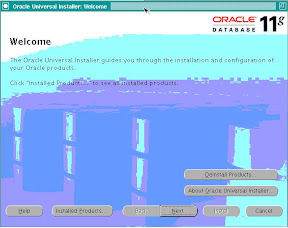
The Welcome Screen - Press Next:
 |
| From For Blog |
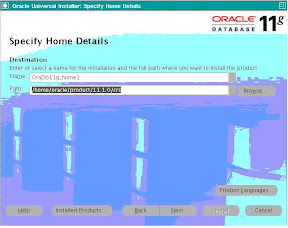
Select the location for your CRS_HOME, where the crs will get installed and Press Next:
 |
| From For Blog |
Oracle does some pre-check, resolve any issues and Press Next:
 |
| From For Blog |
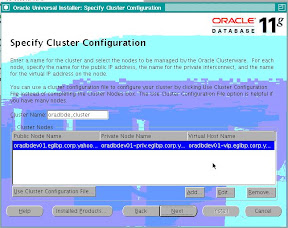
Add information about the cluster nodes and the Press Next:
 |
| From For Blog |
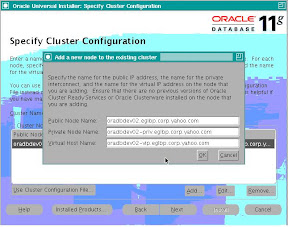
Example of how to add information:
 |
| From For Blog |
Select the Public and Private IP address subnets and Press Next:
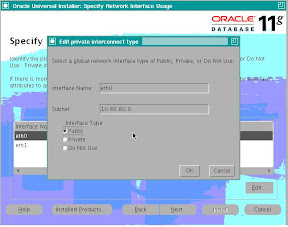 |
| From For Blog |
Specify OCR Location and Press Next:
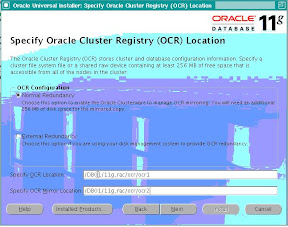 |
| From For Blog |
Specify Voting Disk Location and Press Next:
|
| From For Blog |
Installation summary window, check for the remote node and Press Install:
 |
| From For Blog |
Installation in Progress:
|
| From For Blog |
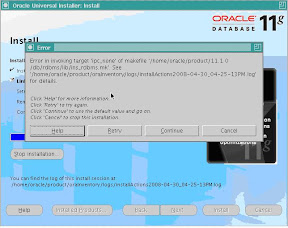
I received this error as I had not setup my environment properly before starting the installation.
Error from make.log
/usr/bin/make -f ins_rdbms.mk ipc_none ORACLE_HOME=/home/oracle/product/11.1.0/db//home/oracle/product/11.1.0/db/rdbms/lib/ins_rdbms.mk:2: /home/oracle/product/11.1.0/db/rdbms/lib/env_rdbms.mk: No such file or directory
make: *** No rule to make target `/home/oracle/product/11.1.0/db/rdbms/lib/env_rdbms.mk'. Stop.
I stopped the installation and setup ORACLE_HOME again and started the install again.
#
# An unexpected error has been detected by HotSpot Virtual Machine:
#
# SIGSEGV (0xb) at pc=0x0000002a9591bb92, pid=8270, tid=1094084960
#
# Java VM: Java HotSpot(TM) 64-Bit Server VM (1.5.0_11-b03 mixed mode)
# Problematic frame:
# V [libjvm.so+0x3a4b92]
#
# An error report file with more information is saved as hs_err_pid8270.log
#
# If you would like to submit a bug report, please visit:
# http://java.sun.com/webapps/bugreport/crash.jsp
Again at this point my $PATH showed wrong path. Hence remove unnecessary entries from $PATH and restarted installation and it worked this time.
 |
| From For Blog |
Run root.sh on both the nodes:
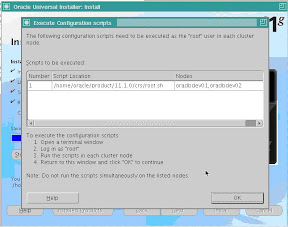 |
| From For Blog |
[oracle@oradbdev01 crs]$ sudo ./root.sh
Password:
WARNING: directory '/home/oracle/product/11.1.0' is not owned by root
WARNING: directory '/home/oracle/product' is not owned by root
WARNING: directory '/home/oracle' is not owned by root
Checking to see if Oracle CRS stack is already configured
Setting the permissions on OCR backup directory
Setting up Network socket directories
PROT-1: Failed to initialize ocrconfig
Failed to upgrade Oracle Cluster Registry configuration
There were permission problems on the folders in node 2.
Resolved the issue and restarted the installation.
Node 1:
Running root.sh:
[oracle@oradbdev01 crs]$ sudo ./root.sh
WARNING: directory '/home/oracle/product/11.1.0' is not owned by root
WARNING: directory '/home/oracle/product' is not owned by root
WARNING: directory '/home/oracle' is not owned by root
Checking to see if Oracle CRS stack is already configured
/etc/oracle does not exist. Creating it now.
Setting the permissions on OCR backup directory
Setting up Network socket directories
Oracle Cluster Registry configuration upgraded successfully
The directory '/home/oracle/product/11.1.0' is not owned by root. Changing owner to root
The directory '/home/oracle/product' is not owned by root. Changing owner to root
The directory '/home/oracle' is not owned by root. Changing owner to root
Successfully accumulated necessary OCR keys.
Using ports: CSS=49895 CRS=49896 EVMC=49898 and EVMR=49897.
node
node 1: oradbdev01 oradbdev01-priv oradbdev01
node 2: oradbdev02 oradbdev02-priv oradbdev02
Creating OCR keys for user 'root', privgrp 'root'..
Operation successful.
Now formatting voting device: /DB01/11g_rac/voting_disk/vote1
Now formatting voting device: /DB01/11g_rac/voting_disk/vote2
Now formatting voting device: /DB01/11g_rac/voting_disk/vote3
Format of 3 voting devices complete.
Startup will be queued to init within 30 seconds.
Adding daemons to inittab
Expecting the CRS daemons to be up within 600 seconds.
Cluster Synchronization Services is active on these nodes.
oradbdev01
Cluster Synchronization Services is inactive on these nodes.
oradbdev02
Local node checking complete. Run root.sh on remaining nodes to start CRS daemons.
Node 2:
[oracle@oradbdev02 crs]$ sudo ./root.sh
Password:
WARNING: directory '/home/oracle/product/11.1.0' is not owned by root
WARNING: directory '/home/oracle/product' is not owned by root
WARNING: directory '/home/oracle' is not owned by root
Checking to see if Oracle CRS stack is already configured
/etc/oracle does not exist. Creating it now.
Setting the permissions on OCR backup directory
Setting up Network socket directories
Oracle Cluster Registry configuration upgraded successfully
The directory '/home/oracle/product/11.1.0' is not owned by root. Changing owner to root
The directory '/home/oracle/product' is not owned by root. Changing owner to root
The directory '/home/oracle' is not owned by root. Changing owner to root
clscfg: EXISTING configuration version 4 detected.
clscfg: version 4 is 11 Release 1.
Successfully accumulated necessary OCR keys.
Using ports: CSS=49895 CRS=49896 EVMC=49898 and EVMR=49897.
node
node 1: oradbdev01 oradbdev01-priv oradbdev01
node 2: oradbdev02 oradbdev02-priv oradbdev02
clscfg: Arguments check out successfully.
NO KEYS WERE WRITTEN. Supply -force parameter to override.
-force is destructive and will destroy any previous cluster
configuration.
Oracle Cluster Registry for cluster has already been initialized
Startup will be queued to init within 30 seconds.
Adding daemons to inittab
Expecting the CRS daemons to be up within 600 seconds.
Cluster Synchronization Services is active on these nodes.
oradbdev01
oradbdev02
Cluster Synchronization Services is active on all the nodes.
Waiting for the Oracle CRSD and EVMD to start
Oracle CRS stack installed and running under init(1M)
Running vipca(silent) for configuring nodeapps
Creating VIP application resource on (2) nodes...
Creating GSD application resource on (2) nodes...
Creating ONS application resource on (2) nodes...
Starting VIP application resource on (2) nodes...
Starting GSD application resource on (2) nodes...
Starting ONS application resource on (2) nodes...
Done.
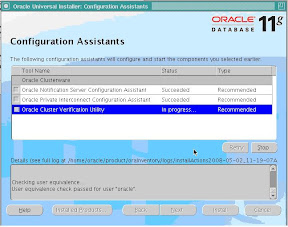
Oracle Run vipca and other configurations: Press Next after it completes:
 |
| From For Blog |
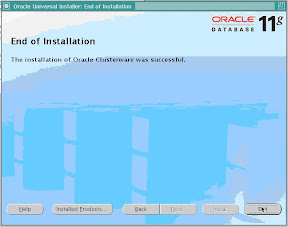
Final Window - Installation Completed!!! - Press Exit:
 |
| From For Blog |
[oracle@oradbdev01 bin]$ ./crsctl check crs
Cluster Synchronization Services appears healthy
Cluster Ready Services appears healthy
Event Manager appears healthy
[oracle@oradbdev02 bin]$ ./crsctl check crs
Cluster Synchronization Services appears healthy
Cluster Ready Services appears healthy
Event Manager appears healthy
This shows that crs installation was successful on both the nodes!!
