Showing posts with label Voting Disk. Show all posts

Thursday, September 1, 2011

How to Move OCR and Voting Disk to ASM Diskgroup in 11gR2

Case: Moving to Redhat Linux 5/Oracle Enterprise Linux 5, which does not support Raw filesytem. Steps: (these steps can be performanced on 11gR2) 1.) Check the current location of ocr file:

[root@host1 bin]# ocrcheck
Status of Oracle Cluster Registry is as follows :
	 Version                  :          3
	 Total space (kbytes)     :     262120
	 Used space (kbytes)      :       3004
	 Available space (kbytes) :     259116
	 ID                       :  798462606
	 Device/File Name         : /mnt/cludata/ocrfile
                                    Device/File integrity check succeeded
                                    Device/File not configured
                                    Device/File not configured
                                    Device/File not configured
                                    Device/File not configured
	 Cluster registry integrity check succeeded
	 Logical corruption check succeeded
2.) Add a Mirror OCR location else you might encounter error :PROT-28: Cannot delete or replace the only configured Oracle Cluster Registry location
i.) Create the file (as root)
cp /dev/null /mnt/cludata/ocrmirror 
chown root:dba /mnt/cludata/ocrmirror 
chmod 640 /mnt/cludata/ocrmirror
[root@host1 cludata]# pwd
/rmanbkp1/cludata
[root@host1 cludata]# ls -lrt
total 23784
-rw-r----- 1 root   dba 272756736 Aug 31 12:37 ocrfile
-rw-r----- 1 root   dba         0 Aug 31 13:12 ocrmirror
-rw-r----- 1 oracle dba  21004288 Aug 31 13:12 cssfile

ii.) Add the mirror OCR file
[root@host1 cludata]# ocrconfig -add /rmanbkp1/cludata/ocrmirror
[root@host1 cludata]# ocrcheck
Status of Oracle Cluster Registry is as follows :
	 Version                  :          3
	 Total space (kbytes)     :     262120
	 Used space (kbytes)      :       3004
	 Available space (kbytes) :     259116
	 ID                       :  798462606
	 Device/File Name         : /mnt/cludata/ocrfile
                                    Device/File integrity check succeeded
	 Device/File Name         : /mnt/cludata/ocrmirror
                                    Device/File integrity check succeeded
                                    Device/File not configured
                                    Device/File not configured
                                    Device/File not configured
	 Cluster registry integrity check succeeded
	 Logical corruption check succeeded
3.) Check ASM Diskgroup compatibility (login as sqlplus / as sysasm)
col name format a10
col COMPATIBILITY format a20
col DATABASE_COMPATIBILITY format a20
select name,COMPATIBILITY,DATABASE_COMPATIBILITY from v$asm_diskgroup;

NAME	   COMPATIBILITY	DATABASE_COMPATIBILI
---------- -------------------- --------------------
DG_ARCH01  10.1.0.0.0		10.1.0.0.0
DG_SYS01   10.1.0.0.0		10.1.0.0.0
DG_TEMP01  10.1.0.0.0		10.1.0.0.0
DG_DATA01 10.1.0.0.0		10.1.0.0.0
4.) Upgrade the compatibility to 11.2 compatible.asm
SQL> alter diskgroup DG_ARCH01 set attribute 'compatible.asm'='11.2';
Diskgroup altered.
SQL> alter diskgroup DG_SYS01 set attribute 'compatible.asm'='11.2';
Diskgroup altered.
SQL> alter diskgroup DG_TEMP01 set attribute 'compatible.asm'='11.2';
Diskgroup altered.
SQL> alter diskgroup DG_DATA01 set attribute 'compatible.asm'='11.2';
Diskgroup altered.

SQL> select name,COMPATIBILITY,DATABASE_COMPATIBILITY from v$asm_diskgroup;
NAME	   COMPATIBILITY	DATABASE_COMPATIBILI
---------- -------------------- --------------------
DG_ARCH01  11.2.0.0.0		10.1.0.0.0
DG_SYS01   11.2.0.0.0		10.1.0.0.0
DG_TEMP01  11.2.0.0.0		10.1.0.0.0
DG_DATA01 11.2.0.0.0		10.1.0.0.0
Update compatible.rdbms
SQL> alter diskgroup DG_ARCH01 set attribute 'compatible.rdbms'='11.2';
Diskgroup altered.
SQL> alter diskgroup DG_SYS01 set attribute 'compatible.rdbms'='11.2';
Diskgroup altered.
SQL> alter diskgroup DG_TEMP01 set attribute 'compatible.rdbms'='11.2';
Diskgroup altered.
SQL> alter diskgroup DG_DATA01 set attribute 'compatible.rdbms'='11.2';
Diskgroup altered.

SQL> select name,COMPATIBILITY,DATABASE_COMPATIBILITY from v$asm_diskgroup;
NAME	   COMPATIBILITY	DATABASE_COMPATIBILI
---------- -------------------- --------------------
DG_ARCH01  11.2.0.0.0		11.2.0.0.0
DG_SYS01   11.2.0.0.0		11.2.0.0.0
DG_TEMP01  11.2.0.0.0		11.2.0.0.0
DG_DATA01 11.2.0.0.0		11.2.0.0.0
5.) Move OCR file to ASM:
ocrconfig -replace /rmanbkp1/cludata/ocrfile -replacement +DG_ARCH01
ocrconfig -replace /rmanbkp1/cludata/ocrmirror -replacement +DG_SYS01
6.) Check OCR:
[root@host1 cludata]# ocrcheck
Status of Oracle Cluster Registry is as follows :
	 Version                  :          3
	 Total space (kbytes)     :     262120
	 Used space (kbytes)      :       3004
	 Available space (kbytes) :     259116
	 ID                       :  798462606
	 Device/File Name         : +DG_ARCH01
                                    Device/File integrity check succeeded
	 Device/File Name         :  +DG_SYS01
                                    Device/File integrity check succeeded
                                    Device/File not configured
                                    Device/File not configured
                                    Device/File not configured
	 Cluster registry integrity check succeeded
	 Logical corruption check succeeded
7.) Restart CRS to check if it comes back fine.
NOTE: You will not be able to stop just ASM now, as the OCR file is in ASM
8.) Check OCR:( as oracle user )
[oracle@host1]~% /home/oragrid/product/11.2/bin/cluvfy comp ocr -n all -verbose

Verifying OCR integrity 

Checking OCR integrity...

Checking the absence of a non-clustered configuration...
All nodes free of non-clustered, local-only configurations

ASM Running check passed. ASM is running on all cluster nodes

Checking OCR config file "/etc/oracle/ocr.loc"...

OCR config file "/etc/oracle/ocr.loc" check successful

Disk group for ocr location "+DG_SYS01" available on all the nodes

Disk group for ocr location "+DG_ARCH01" available on all the nodes

Checking size of the OCR location "+DG_SYS01" ...

Size check for OCR location "+DG_SYS01" successful...

Checking size of the OCR location "+DG_ARCH01" ...

Size check for OCR location "+DG_ARCH01" successful...

WARNING: 
This check does not verify the integrity of the OCR contents. Execute 'ocrcheck' as a privileged user to verify the contents of OCR.

OCR integrity check passed

Verification of OCR integrity was successful. 
9.) Move Voting disk now
[root@host1 cludata]# crsctl replace votedisk +DG_ARCH01
CRS-4256: Updating the profile
Successful addition of voting disk aa5d2a1024384faebf3f2c108e6b203a                                                                                                                                                                                                                                .
Successful deletion of voting disk 253472991d324fb9bfab1f1301385697.
Successfully replaced voting disk group with +DG_ARCH01.
CRS-4256: Updating the profile
CRS-4266: Voting file(s) successfully replaced
10.) Check Voting Disk:
[root@host1 cludata]# crsctl query css votedisk
##  STATE    File Universal Id                File Name Disk group
--  -----    -----------------                --------- ---------
 1. ONLINE   aa5d2a1024384faebf3f2c108e6b203a (ORCL:DISK2) [DG_ARCH01]
Located 1 voting disk(s).
[root@host1 cludata]# crsctl check crs
CRS-4638: Oracle High Availability Services is online
CRS-4537: Cluster Ready Services is online
CRS-4529: Cluster Synchronization Services is online
CRS-4533: Event Manager is online
11.) Check contents of ocr.loc file
[root@host1 cludata]# more /etc/oracle/ocr.loc
#Device/file /mnt/cludata/ocrmirror getting replaced by device +DG_SYS01 
ocrconfig_loc=+DG_ARCH01
ocrmirrorconfig_loc=+DG_SYS01
local_only=false
ALL LOOKS GOOD NOW !!!
Wednesday, April 1, 2009

What is Voting Disk & Split Brain Syndrome in RAC

Voting Disk


Oracle Clusterware uses the voting disk to determine which instances are members of a cluster. The voting disk must reside on a shared disk. Basically all nodes in the RAC cluster register their heart-beat information on thes voting disks. The number decides the number of active nodes in the RAC cluster. These are also used for checking the availability of instances in RAC and remove the unavailable nodes out of the cluster. It helps in preventing split-brain condition and keeps database information intact. The split brain syndrome and its affects and how it has been managed in oracle is mentioned below.
For high availability, Oracle recommends that you have a minimum of three voting disks. If you configure a single voting disk, then you should use external mirroring to provide redundancy. You can have up to 32 voting disks in your cluster. What I could understand about the odd value of the number of voting disks is that a noe should see maximun number of voting disk to continue to function, so with 2, if it can see only 1, its not the maximum value but a half value of voting disk. I am still trying to search more on this concept.

Split Brain Syndrome:


In a Oracle RAC environment all the instances/servers communicate with each other using high-speed interconnects on the private network. This private network interface or interconnect are redundant and are only used for inter-instance oracle data block transfers. Now talking about split-brain concept with respect to oracle rac systems, it occurs when the instance members in a RAC fail to ping/connect to each other via this private interconnect, but the servers are all pysically up and running and the database instance on each of these servers is also running. These individual nodes are running fine and can conceptually accept user connections and work independently. So basically due to lack of commincation the instance thinks that the other instance that it is not able to connect is down and it needs to do something about the situation. The problem is if we leave these instance running, the sane block might get read, updated in these individual instances and there would be data integrity issue, as the blocks changed in one instance, will not be locked and could be over-written by another instance. Oracle has efficiently implemented check for the split brain syndrome.

What does RAC do incase node becomes inactive:


In RAC if any node becomes inactive, or if other nodes are unable to ping/connect to a node in the RAC, then the node which first detects that one of the node is not accessible, it will evict that node from the RAC group. e.g. there are 4 nodes in a rac instance, and node 3 becomes unavailable, and node 1 tries to connect to node 3 and finds it not responding, then node 1 will evict node 3 out of the RAC groups and will leave only Node1, Node2 & Node4 in the RAC group to continue functioning.
The split brain concepts can become more complicated in large RAC setups. For example there are 10 RAC nodes in a cluster. And say 4 nodes are not able to communicate with the other 6. So there are 2 groups formed in this 10 node RAC cluster ( one group of 4 nodes and other of 6 nodes). Now the nodes will quickly try to affirm their membership by locking controlfile, then the node that lock the controlfile will try to check the votes of the other nodes. The group with the most number of active nodes gets the preference and the others are evicted. Moreover, I have seen this node eviction issue with only 1 node getting evicted and the rest function fine, so I cannot really testify that if thats how it work by experience, but this is the theory behind it.
When we see that the node is evicted, usually oracle rac will reboot that node and try to do a cluster reconfiguration to include back the evicted node.
You will see oracle error: ORA-29740, when there is a node eviction in RAC. There are many reasons for a node eviction like heart beat not received by the controlfile, unable to communicate with the clusterware etc.
A good metalink note on understanding node eviction and how to address is Note ID: 219361.1

The CSS (Cluster Synchronization Service) daemon in the clusterware maintains the heart beat to the voting disk.

Monday, April 21, 2008

10.2.0.1 CRS Installation and upgrade to 10.2.0.3 for RAC

Download oracle crs software from http://www.oracle.com/technology/software/index.html location. For this document we will use oracle 10.2.0.1 crs software.

i.e. 10201_clusterware_linux_x86_64.cpio
##cpio –idmv <>

As we are building a 2 node RAC system, we will need to setup user equivalence for oracle user between both the nodes. Its done by generating ssh keys on both the nodes and concatenating then in a file called authorized_keys. The file need to be in $HOME/.ssh directory on all the RAC nodes.
Now change directory to the clusterware software and then to cluvfy and run the pre-check:
[oracle@ac-oracle-001]~/stage/clusterware/cluvfy% ./runcluvfy.sh stage -pre crsinst -n -oracle-001,ac-oracle-002

Performing pre-checks for cluster services setup

Checking node reachability...
Node reachability check passed from node "ac-oracle-001".


Checking user equivalence...
User equivalence check passed for user "oracle".

Checking administrative privileges...
User existence check passed for "oracle".
Group existence check failed for "oinstall".
Check failed on nodes:
ac-oracle-002,ac-oracle-001

Administrative privileges check failed.

Checking node connectivity...

Node connectivity check passed for subnet "76.13.224.64" with node(s) ac-oracle-002,ac-oracle-001.
Node connectivity check passed for subnet "10.128.159.0" with node(s) ac-oracle-002,ac-oracle-001.

Suitable interfaces for VIP on subnet "76.13.224.64":
ac-oracle-002 eth0:76.13.224.119 eth0:76.13.224.111
ac-oracle-001 eth0:76.13.224.120 eth0:76.13.224.112

Suitable interfaces for the private interconnect on subnet "10.128.159.0":
ac-oracle-002 ib1:10.128.159.53
ac-oracle-001 ib1:10.128.159.52

Node connectivity check passed.


Checking system requirements for 'crs'...
Total memory check passed.
Free disk space check passed.
Swap space check passed.
System architecture check passed.
Kernel version check passed.
Package existence check passed for "binutils-2.15.92.0.2-13".
Group existence check passed for "dba".
Group existence check failed for "oinstall".
Check failed on nodes:
ac-oracle-002,ac-oracle-001
User existence check passed for "nobody".

System requirement failed for 'crs'

Pre-check for cluster services setup was unsuccessful on all the nodes.

As I am not using oinstall group, I am going to ignore the error for the oinstall group not existing.
Now invoke the installer:
[oracle@ac-oracle-001]~/stage/clusterware%./runInstaller
This is give you the welcome screen, please press next.
Then:
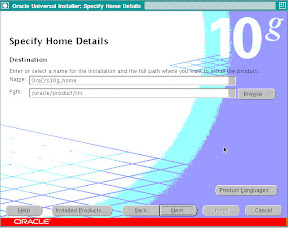
From For Blog


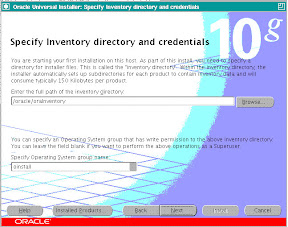
Select the Ora Inventory location and "dba" as the group for installation. And press Next:
From For Blog


Select location of CRS_HOME and press Next:

From For Blog


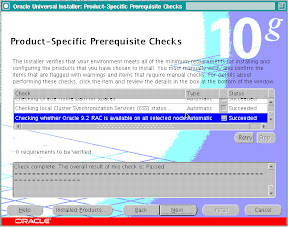
This screen shows that the installer is running a check from pre-requisites.
This should complete without error, check for warnings if any. I received a warning for Swap space, so I continued the installation, deciding to take care of the swap space latter. Press Next:

From For Blog


Add node information in this window:

From For Blog


Specify the Pulic Name, Private Name and VIP Name for the various RAC nodes:

From For Blog


Press Next:

From For Blog


I received the above error, this happened as the user equivalence was not setup properly. I rectified the problem and proceeded.

From For Blog


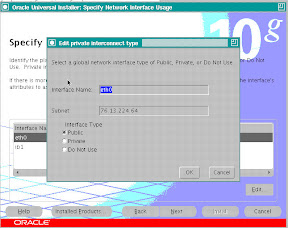
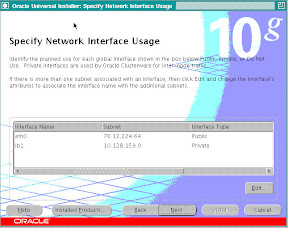
This shows the details for the Public and Private IP, Please verify and see if the installer has got the right information about the IP addresses.

From For Blog

Press Next:

From For Blog


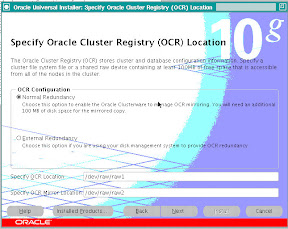
Specify the location of OCR files and Press Next:
From For Blog


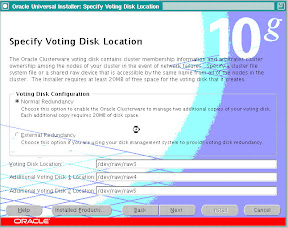
Specify the location of Voting Disk Files and Press Next:

Next you will see the install summary page, please press INSTALL on this page.
From For Blog


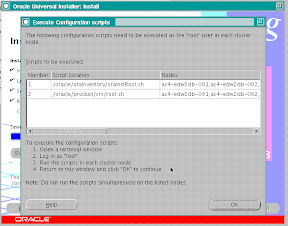
After the installation completes you will be asked to run the orainstRoot.sh and root.sh as root user.

From For Blog


Before running the root.sh & orainstRoot.sh download and apply patch 4679769
[oracle@ac-oracle-001]~/stage/clusterware/patch/4679769% cp -p /oracle/product/crs/bin/clsfmt.bin /oracle/product/crs/bin/clsfmt.bin.bak
[oracle@ac-oracle-001]~/stage/clusterware/patch/4679769%
[oracle@ac-oracle-001]~/stage/clusterware/patch/4679769% ls -l /oracle/product/crs/bin/clsfmt*
-rwxr-xr-x 1 oracle dba 1676 Apr 18 08:36 /oracle/product/crs/bin/clsfmt
-rwxr-xr-x 1 oracle dba 687684 Oct 20 2005 /oracle/product/crs/bin/clsfmt.bin
-rwxr-xr-x 1 oracle dba 687684 Oct 20 2005 /oracle/product/crs/bin/clsfmt.bin.bak
[oracle@ac-oracle-001]~/stage/clusterware/patch/4679769%
[oracle@ac-oracle-001]~/stage/clusterware/patch/4679769% cp clsfmt.bin /oracle/product/crs/bin/clsfmt.bin
[oracle@ac-oracle-001]~/stage/clusterware/patch/4679769%
[oracle@ac-oracle-001]~/stage/clusterware/patch/4679769% chmod 755 /oracle/product/crs/bin/clsfmt.bin
[oracle@ac-oracle-001]~/stage/clusterware/patch/4679769%
[oracle@ac-oracle-001]~/stage/clusterware/patch/4679769% ls -lart /oracle/product/crs/bin/clsfmt.bi*
-rwxr-xr-x 1 oracle dba 687684 Oct 20 2005 /oracle/product/crs/bin/clsfmt.bin.bak
-rwxr-xr-x 1 oracle dba 687320 Apr 18 08:45 /oracle/product/crs/bin/clsfmt.bin
[oracle@ac-oracle-001]~/stage/clusterware/patch/4679769%

[oracle@ac-oracle-001]~/oraInventory% sudo ./orainstRoot.sh
Password:
Changing permissions of /oracle/oraInventory to 770.
Changing groupname of /oracle/oraInventory to dba.
The execution of the script is complete
[oracle@ac-oracle-001]~/oraInventory% cd
[oracle@ac-oracle-001]~% cd product/crs
[oracle@ac-oracle-001]~/product/crs% sudo ./root.sh
WARNING: directory '/oracle/product' is not owned by root
WARNING: directory '/' is not owned by root
Checking to see if Oracle CRS stack is already configured
/etc/oracle does not exist. Creating it now.

Setting the permissions on OCR backup directory
Setting up NS directories
Oracle Cluster Registry configuration upgraded successfully
WARNING: directory '/oracle/product' is not owned by root
WARNING: directory '/' is not owned by root
Successfully accumulated necessary OCR keys.
Using ports: CSS=49895 CRS=49896 EVMC=49898 and EVMR=49897.
node :
node 1: ac-oracle-001 ac-oracle-001-i ac-oracle-001
node 2: ac-oracle-002 ac-oracle-002-i ac-oracle-002
Creating OCR keys for user 'root', privgrp 'root'..
Operation successful.
Now formatting voting device: /dev/raw/raw3
Now formatting voting device: /dev/raw/raw4
Now formatting voting device: /dev/raw/raw5
Format of 3 voting devices complete.
Startup will be queued to init within 90 seconds.
Adding daemons to inittab
Expecting the CRS daemons to be up within 600 seconds.
CSS is active on these nodes.
ac-oracle-001
CSS is inactive on these nodes.
ac-oracle-002
Local node checking complete.
Run root.sh on remaining nodes to start CRS daemons.

These 2 scripts need to be run on all RAC nodes.
These format and initializes the OCR & Voting Disks.
After the root.sh has completed successfully, the crs would come up on that node.

This completes the 10.2.0.1 CRS Installation.
To upgrade the same to 10.2.0.3 download the patch 5337014, use the runInstaller provided in this patch-set to upgrade the CRS home to 10.2.0.3
The most important step is to run the root102.sh after the upgrade installer completes, you have to run this on all the RAC nodes:
[oracle@ac-oracle-001]~% cd product/crs/install
[oracle@ac-oracle-001]~/product/crs/install% ls -lrt
total 168
-rwxr-xr-x 1 oracle dba 0 Feb 23 2005 install.incl
-rwxr-xr-x 1 oracle dba 38 Apr 19 2005 install.excl
-rw-rw---- 1 oracle dba 2800 Jun 7 2005 templocal
-r-xr-xr-x 1 oracle dba 4150 Aug 11 2005 rootaddnode.sbs
-rwxr-xr-x 1 oracle dba 1092 Oct 18 2005 cmdllroot.sh
-rw-rw---- 1 oracle dba 9625 Apr 18 08:36 rootlocaladd
-r-xr-xr-x 1 oracle dba 17029 Apr 18 08:36 rootupgrade
-r-xr-xr-x 1 oracle dba 3580 Apr 18 08:36 rootinstall
-r-xr-xr-x 1 oracle dba 12072 Apr 18 08:36 rootdelete.sh
-r-xr-xr-x 1 oracle dba 3918 Apr 18 08:36 rootdeletenode.sh
-r-xr-xr-x 1 oracle dba 8154 Apr 18 08:36 rootdeinstall.sh
-r-xr-xr-x 1 oracle dba 34063 Apr 18 08:36 rootconfig
-rwxr-xr-x 1 oracle dba 4570 Apr 18 08:36 preupdate.sh
-rw-rw---- 1 oracle dba 1760 Apr 18 08:36 paramfile.crs
-rw-rw---- 1 oracle dba 4065 Apr 18 08:36 make.log
-rw-rw---- 1 oracle dba 32 Apr 18 08:36 cluster.ini
-rw-rw---- 1 oracle dba 177 Apr 18 08:37 envVars.properties
-rwxr-xr-x 1 oracle dba 23126 Apr 18 11:36 root102.sh
drwxr-xr-x 32 oracle dba 4096 Apr 18 11:39 patch102
[oracle@ac-oracle-001]~/product/crs/install% sudo ./root102.sh
Password:
Creating pre-patch directory for saving pre-patch clusterware files
Completed patching clusterware files to /oracle/product/crs
Relinking some shared libraries.
Relinking of patched files is complete.
WARNING: directory '/oracle/product' is not owned by root
Preparing to recopy patched init and RC scripts.
Recopying init and RC scripts.
Startup will be queued to init within 30 seconds.
Starting up the CRS daemons.
Waiting for the patched CRS daemons to start.
This may take a while on some systems.
.
10203 patch successfully applied.
clscfg: EXISTING configuration version 3 detected.
clscfg: version 3 is 10G Release 2.
Successfully accumulated necessary OCR keys.
Using ports: CSS=49895 CRS=49896 EVMC=49898 and EVMR=49897.
node :
node 8: ac-oracle-008 ac-oracle-008-i ac-oracle-008
Creating OCR keys for user 'root', privgrp 'root'..
Operation successful.
clscfg -upgrade completed successfully
[oracle@ac-oracle-008]~/product/crs/install% cd ../bin
[oracle@ac-oracle-008]~/product/crs/bin% ./crsctl query crs softwareversion
CRS software version on node [ac-oracle-001] is [10.2.0.3.0]

Tuesday, April 15, 2008

Move/Replace/Change Location of OCR & Voting Disk

How To Change the location of OCR & Voting Disk in 10gR2 Oracle RAC

Voting Disk:
1.) Login as root
2.) Shutdown CRS on all nodes:

root@oracle-server:/home/crs/bin[bin]# ./crsctl stop crs
Stopping resources.
Successfully stopped CRS resources
Stopping CSSD.
Shutting down CSS daemon.
Shutdown request successfully issued.
root@oracle-server:/home/crs/bin[bin]# ./crsctl check crs
Failure 1 contacting CSS daemon
Cannot communicate with CRS
Cannot communicate with EVM

3.) Check the the location of the voting disk:

root@oracle-server:/home/crs/bin[bin]# ./crsctl query css votedisk
0. 0 /mnt/db_crs/vd1
1. 0 /mnt/db_crs/vd2
2. 0 /mnt/db_crs/vd3

4.) Copy the voting disk to the new location:
root@oracle-server:/home/crs/bin[bin]# cp /mnt/db_crs/vd2 /mnt/db_crs_mirror1/
root@oracle-server:/home/crs/bin[bin]# cp /mnt/db_crs/vd3 /mnt/db_crs_mirror2/

5.) Change the location in CRS:

root@oracle-server:/home/crs/bin[bin]# ./crsctl add css votedisk /mnt/db_crs_mirror1/vd2
Now formatting voting disk: /mnt/db_crs_mirror1/vd2
successful addition of votedisk /mnt/db_crs_mirror1/vd2.
root@oracle-server:/home/crs/bin[bin]# ./crsctl add css votedisk /mnt/db_crs_mirror2/vd3
Now formatting voting disk: /mnt/db_crs_mirror2/vd3
successful addition of votedisk /mnt/db_crs_mirror2/vd3.

6.) Delete the old Voting Disks:

root@oracle-server:/home/crs/bin[bin]# crsctl delete css votedisk /mnt/db_crs/vd2 -force
successful deletion of votedisk /mnt/db_crs/vd2.
root@oracle-server:/home/crs/bin[bin]# crsctl delete css votedisk /mnt/db_crs/vd3 -force
successful deletion of votedisk /mnt/db_crs/vd3.

7.) Query CRS to see if the changes where proper:

root@oracle-server:/home/crs/bin[bin]# ./crsctl query css votedisk
0. 0 /mnt/db_crs/vd1
1. 0 /mnt/db_crs_mirror2/vd3
2. 0 /mnt/db_crs_mirror1/vd2

PS: The permission to the voting disk should be root:dba, while copying and creating voting disk as we are using the root user, the permission will change to root:root, which will give error when starting crs.

OCR:

1.) Login as root.

2.) Start CRS on all nodes:

root@oracle-server:/home/crs/bin[bin]# ./crsctl start crs

Attempting to start CRS stack

The CRS stack will be started shortly

root@oracle-server:/home/crs/bin[bin]# ./crsctl check crs

Failure 1 contacting CSS daemon

Cannot communicate with CRS

Cannot communicate with EVM

root@oracle-server:/home/crs/bin[bin]# ./crsctl check crs

CSS appears healthy

CRS appears healthy

EVM appears healthy

3.) Check OCR configuration/backups:

root@oracle-server:/home/crs/bin[bin]# ocrcheck

Status of Oracle Cluster Registry is as follows :

Version : 2

Total space (kbytes) : 262144

Used space (kbytes) : 2812

Available space (kbytes) : 259332

ID : 429958626

Device/File Name : /mnt/db_crs/crs

Device/File integrity check succeeded

Device/File Name : /mnt/db_crs/crs_mirror

Device/File integrity check succeeded

Cluster registry integrity check succeeded

root@oracle-server:/home/crs/bin[bin]# ocrconfig -showbackup

oracle-server 2008/04/10 23:47:02 /oracle/product/10.2.0/crs/cdata/ac4-db-crs

oracle-server 2008/04/10 19:47:03 /oracle/product/10.2.0/crs/cdata/ac4-db-crs

oracle-server 2008/04/10 15:47:04 /oracle/product/10.2.0/crs/cdata/ac4-db-crs

oracle-server 2008/04/08 19:47:17 /oracle/product/10.2.0/crs/cdata/ac4-db-crs

oracle-server 2008/04/03 15:47:53 /oracle/product/10.2.0/crs/cdata/ac4-db-crs

4.) Copy the OCR mirror to the new location:

root@oracle-server:/mnt/prdaudit_crs[root@oracle-server db_crs]# ls -rlt

mtotal 38916

-rw-r--r-- 1 oracle dba 10240000 Apr 11 02:27 vd2.old

-rw-r--r-- 1 oracle dba 10240000 Apr 11 02:27 vd3.old

-rw-r----- 1 root dba 3121152 Apr 11 02:59 crs_mirror

-rw-r----- 1 root dba 3121152 Apr 11 03:22 crs

-rw-r--r-- 1 oracle dba 10240000 Apr 11 03:23 vd1

root@oracle-server:/mnt/db_crs[root@oracle-server db_crs]# cp crs_mirror /mnt/db_crs_mirror1

Check the permission, it should be root:dba

5.) Change the OCR location in the CRS:

root@oracle-server:/home/crs/bin[bin]# ./ocrconfig -replace ocrmirror /mnt/db_crs_mirror1/crs_mirror

Same way to can move the ocr:

oraconfig -replace ocr

root@oracle-server:/home/crs/bin[bin]# ocrcheck

Status of Oracle Cluster Registry is as follows :

Version : 2

Total space (kbytes) : 262144

Used space (kbytes) : 2812

Available space (kbytes) : 259332

ID : 429958626

Device/File Name : /mnt/db_crs/crs

Device/File integrity check succeeded

Device/File Name : /mnt/db_crs_mirror1/crs_mirror

Device/File integrity check succeeded

Cluster registry integrity check succeeded

root@oracle-server:/home/crs/bin[bin]# exit

OCR AND VOTING DISK MOVED!!!!